TikTok Shop Xero Integration: A Guide to Automated Accounting 2026
Learn how a TikTok Shop Xero integration can automate your e-commerce accounting. Sync sales, fees, and inventory for seamless reconciliation and growth.
Learn how a TikTok Shop Xero integration can automate your e-commerce accounting. Sync sales, fees, and inventory for seamless reconciliation and growth.

Connecting your TikTok Shop and Xero accounts isn’t a simple, direct plug-and-play. You need a middleware tool like OneCart to bridge the gap, automating how your sales, fees, and payout data get synced. This connection turns chaotic TikTok Shop reports into clean, reconciled entries in your Xero account.
For any serious seller, this is a foundational step. It saves dozens of hours every month and, more importantly, prevents the kind of costly accounting errors that can quietly sabotage a growing business. This is the setup you need to scale.
When your TikTok Shop first takes off, the rush of seeing sales notifications is thrilling. But that excitement can quickly sour into a bookkeeping nightmare. What starts as a manageable spreadsheet soon becomes a massive time-drain and a breeding ground for financial errors that silently eat away at your profits.
The manual process of tracking every single order, fee, and refund does not scale.

Imagine this scenario: your bi-weekly payout from TikTok Shop hits the bank. It’s one lump sum, but it represents hundreds, maybe thousands, of individual transactions. Each transaction is a messy bundle of numbers:
Trying to match that single payout figure to thousands of spreadsheet rows is more than tedious—it’s a recipe for disaster. You can burn days trying to make the numbers line up, only to be left with unexplained gaps. For example, if a payout of $8,500 arrives but your sales spreadsheet shows $10,000, you have to manually hunt for the $1,500 in fees, ad spend, and refunds. This manual work completely obscures your true financial health.
Actionable Insight: Manual accounting forces you to look backward. You’re always playing catch-up, trying to piece together what happened last week instead of using real-time data to make smart decisions for next week.
The broader impact of inefficient manual data entry goes far beyond just lost time; it cripples your ability to be strategic.
To truly grasp the difference, let’s compare the day-to-day reality of both approaches. One is a constant struggle, while the other puts you in control.
| Task | Manual Method (The Spreadsheet Nightmare) | Automated Integration (The Scalable Solution) |
|---|---|---|
| Daily Sales Entry | Export CSVs, copy-paste hundreds of lines, and pray you don’t make a typo. | Orders sync to Xero automatically as they happen, creating clean invoices. |
| Payout Reconciliation | Spend hours matching a single payout to thousands of individual sales, fees, and refunds. | The integration generates a summary invoice that matches the payout exactly, making reconciliation a one-click task. |
| Fee & Ad Spend Tracking | Manually calculate and categorize commissions, shipping fees, and ad costs for each order. | All fees and costs are automatically broken down and mapped to the correct accounts in Xero. |
| Real-Time Financial View | Your numbers are always days or weeks out of date. You have no real-time view of profitability. | See your true profit margin on every single order, updated instantly. |
| Decision Making | Based on guesswork and outdated reports. “Are we profitable?” is a hard question to answer. | Based on accurate, real-time data. You know exactly which products are making you money. |
The table makes it pretty clear. One path leads to burnout and financial uncertainty, while the other provides the clarity needed for profitable growth.
This reliance on manual work creates a fog around your finances. Without a clean, automated flow of information into your accounting software, you’re essentially flying blind. You might think a hot-selling product is a cash cow, but after you properly account for the ad spend and platform fees behind it, you might find it’s barely breaking even.
As TikTok Shop continues its explosive growth, this chaos only gets worse. For a typical $10,000 payout, it’s common to see only $7,500 in net sales after all the fees, ads, and refunds are stripped out. Automating this reconciliation is proven to speed up the month-end close by 70-80% for sellers who make the switch.
A proper TikTok Shop Xero integration is a fundamental tool for any seller who wants to scale profitably, stay compliant, and gain the financial clarity needed to actually win on the platform.
Think of OneCart as an expert data translator sitting between your TikTok Shop and Xero account. It takes the raw, often messy, order information from your shop and converts it into a clean, simple language that Xero understands perfectly.
OneCart intelligently processes and organizes everything. It pulls all the critical details—sales, TikTok fees, refunds, and customer info—then bundles it all into a single, summarized journal entry. This is the secret to keeping your books accurate and organized without lifting a finger.
One of the biggest headaches for high-volume TikTok Shop sellers is the sheer flood of individual transactions. If every single sale created its own entry in Xero, your account would quickly get buried under thousands of line items, making bank reconciliation a nightmare.
This is exactly why the summary invoice method is so essential. Instead of creating a separate invoice for each order, OneCart smartly groups all the transactions that belong to a single TikTok Shop payout.
Here’s a practical example:
This one invoice has detailed line items that clearly break down the gross sales, fees, and refunds, making sure the final amount matches the $5,000 deposit in your bank account down to the last cent. You can learn more about how OneCart streamlines this for Xero users.
Actionable Insight: By summarizing transactions on a per-payout basis, you get all the financial detail you need for accurate reporting without flooding your accounting system with thousands of tiny, hard-to-manage entries.
This approach is the foundation of a scalable accounting workflow. It automates the most tedious part of your bookkeeping, freeing you up to focus on growing your business instead of wrestling with spreadsheets.
This screenshot shows how a platform like OneCart acts as a central hub, connecting multiple sales channels like TikTok Shop to manage operations efficiently. This centralized control makes a clean data flow possible for accurate accounting integrations with systems like Xero.
A crucial part of the setup is data mapping. This is where you tell OneCart exactly where each piece of financial information from your TikTok Shop should go in your Xero Chart of Accounts. Getting this right gives you a crystal-clear view of your true profitability.
Here is a practical example of mapping different types of deductions to specific expense accounts in Xero:
This level of detail is critical. In the fast-paced world of social commerce, tools like OneCart enable the seamless syncing of all this data—from sales and fees to refunds and taxes—directly into Xero. For many sellers, this automates the breakdown of each payout, where seller fees often average 6-8% in major markets and refunds can account for 5-10% of total orders, ensuring precise reconciliation with your bank deposits. Use our TikTok Shop fee calculator to model these costs before syncing—it helps you verify your Xero mappings are capturing every fee correctly.
This detailed categorization also extends to your Cost of Goods Sold (COGS). When an order syncs, OneCart can trigger a journal entry in Xero that moves the cost of that product from your “Inventory Asset” account to your “COGS” expense account. This keeps both your inventory valuation and your gross profit margins accurate in real-time. Without this step, you would be operating with an incomplete picture of your financial performance.
Let’s move from theory to action. This is your hands-on guide to getting the TikTok Shop Xero integration up and running with OneCart. Getting this connection right from the start is the key to unlocking accurate, automated accounting down the road. We’ll break the whole thing down into three core phases to make sure it’s a smooth launch.
First, take a look at this flow chart. It’s a simple visual of how your data moves from TikTok Shop, gets processed by OneCart, and lands neatly in Xero.
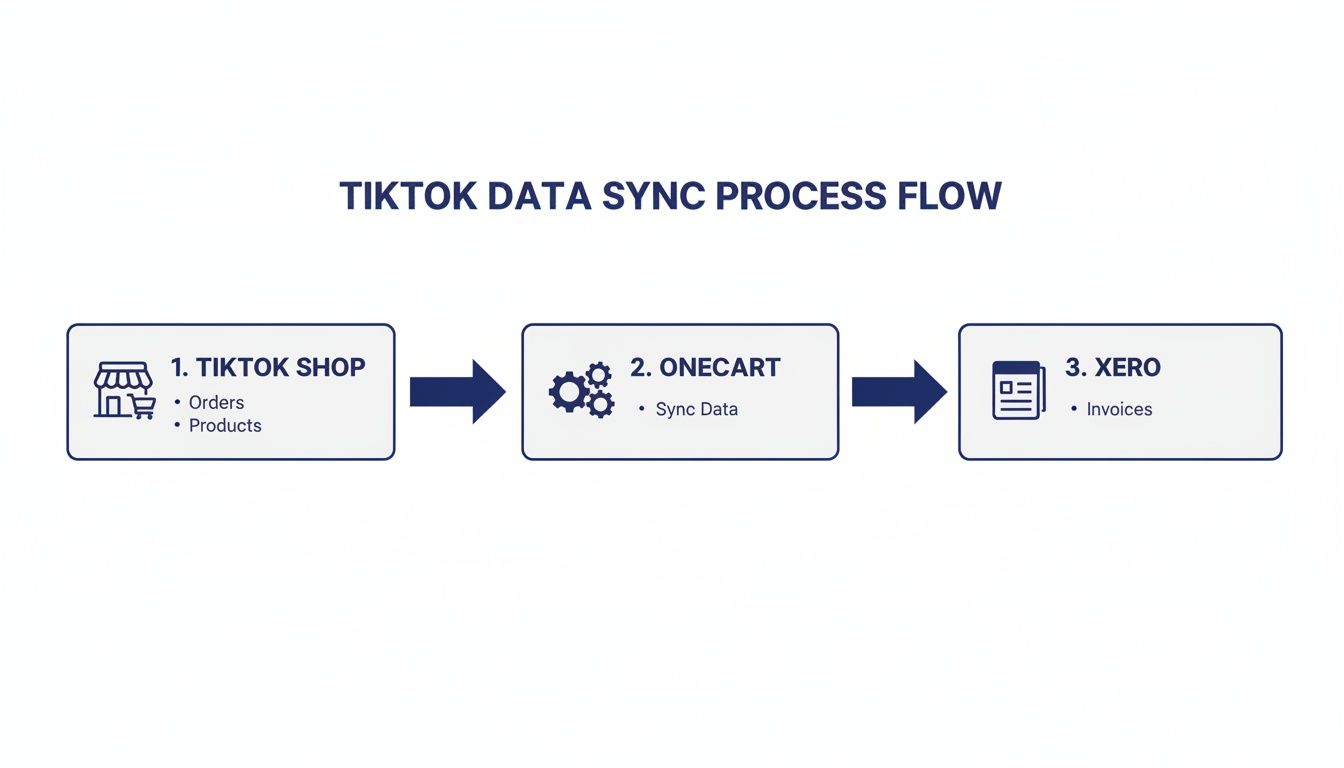
As you can see, OneCart is the essential bridge here. It translates all that raw sales data into structured financial entries that your accounting system can actually understand.
Before you connect anything, you need to prepare your Xero account. A little groundwork here prevents massive headaches later.
Think of it like setting up labeled folders before you start filing documents. You want a clean system from day one.
Start by going into your Chart of Accounts in Xero. You’ll want to create a few specific accounts to track your TikTok Shop activity properly. Here are some actionable suggestions:
Setting these up ensures your financial reports will be detailed enough to be genuinely useful for making business decisions.
With your Xero account ready to go, the next step is linking your platforms to OneCart. This is a straightforward process that involves authorizing OneCart to access the necessary data from both your TikTok Shop Seller Centre and your Xero organization.
You’ll be guided through a secure login for each platform. This creates the digital handshake that lets OneCart pull sales data from TikTok and push summary invoices into Xero for you. You don’t need to share any passwords; it’s all handled through official, secure API connections. If you want more details on the technical side, you can find them in our guides on connecting your platforms.
Actionable Insight: This authorization is a one-time setup. Once you’re connected, OneCart keeps the link secure, ensuring a reliable and continuous flow of data between your sales channel and your accounting software.
Pay attention here, because this is the most critical part of the setup. This is where you tell OneCart exactly how to handle your financial data. You’re essentially creating the rulebook for your automated bookkeeping.
The main task is to map the different financial components of a TikTok Shop order—sales, fees, shipping—to those specific Xero accounts you just created.
Practical Mapping Example:
Let’s say you get a single payout from TikTok Shop. OneCart will break it down and, based on the rules you set, post the data like this:
This detailed mapping ensures every dollar is accounted for and categorized correctly. Without it, all your expenses might just get dumped into one generic “fees” account, hiding valuable insights into your real profitability.
Before you let the system run on autopilot and pull in months of old data, it’s smart to run a small test. The best way to do this is by syncing just one recent payout from TikTok Shop.
Pick your latest completed payout and let OneCart sync it over to Xero. Then, open up Xero and take a close look at the summary invoice that was created.
Once you’ve confirmed that this first payout synced perfectly, you can go ahead and import your historical data with confidence. This simple check acts as a final safety net, making sure your TikTok Shop Xero integration is set up for perfect accuracy right from the start.
This is where all your setup efforts really start to pay off. With a proper TikTok Shop Xero integration, the chaotic, time-consuming job of bank reconciliation becomes almost effortless. You go from spending hours hunting down discrepancies to just confirming accurate data with a single click.
Let’s walk through a real-world scenario. A payout of $8,450 from TikTok Shop hits your business bank account. In the past, this would have kicked off a long, manual process of matching sales to that lump sum. Now, when you open your Xero dashboard, OneCart has already done the heavy lifting.
Instead of a confusing lump sum, you see a perfectly prepared summary invoice waiting for you in Xero. This single invoice automatically breaks down the entire payout period, giving you a clear picture of what happened.
Here’s a practical example of what the integration prepares for you:
The total deductions come to $1,550, leaving a net payout of $8,450. This number matches the bank deposit exactly. Xero’s bank feed reconciliation feature sees the incoming deposit and instantly suggests matching it to this invoice. All you have to do is click “OK.” That’s it. You’ve just reconciled hundreds of orders in seconds.
For sellers dealing with complex payouts, it’s key to understand the nuances of TikTok Shop’s data. You can find out more about why certain net amount data may vary and how an integration helps standardize it for accounting purposes right here: https://www.getonecart.com/help/why-tiktok-shop-net-amount-data-is-currently-unavailable/
With clean, categorized data flowing into Xero daily, you unlock the full power of its reporting suite. You’re no longer guessing about your financial performance; you have accurate, up-to-the-minute insights at your fingertips.
This automated system means you can generate critical financial statements instantly.
Actionable Insight: The real win is the ability to generate an accurate Profit & Loss statement for your TikTok Shop channel whenever you need it, revealing your true profitability.
You can finally answer crucial business questions with confidence:
Beyond the basics, Xero’s robust reporting tools offer a deeper dive into your finances. With clean data, you can effectively use Xero’s reporting tools to cut costs and find opportunities for growth.
This level of financial clarity allows you to be proactive rather than reactive. For instance, if you see your ad spend rising from 5% to 15% of your revenue over two weeks, you can investigate and adjust your campaigns immediately, not weeks later when the damage is done.
Looking ahead, TikTok Shop Xero integrations are becoming essential for e-commerce teams scaling across multiple marketplaces. For a store with $50,000 in monthly gross sales, an integration can automatically categorize the 7% platform fees, 4% ad spend, and 9% refund rate. It then posts the final net amount, making the month-end close significantly faster.
This kind of automation is critical for success. It transforms your accounting from a painful chore into a strategic asset that fuels smarter growth.
Once you’ve got your basic TikTok Shop Xero integration up and running, you can refine it further. It’s one thing to have orders syncing; it’s another to have a system that’s truly accurate, audit-proof, and powerful enough to scale with your business.
This is where you move beyond the setup wizard and start refining the details. Getting these advanced pieces right turns a simple connection into a robust financial command center for your e-commerce brand.
Nailing the tricky stuff—like handling multiple currencies, sales tax, and chargebacks correctly—is non-negotiable for any serious seller. Let’s dig into the strategies that separate the amateurs from the pros.
If you sell internationally, you’re going to get paid in different currencies. A classic rookie mistake is grabbing a daily exchange rate from Google and manually converting your sales figures. This almost never matches the rate your bank or TikTok actually uses, creating small discrepancies that snowball into a massive reconciliation headache.
A properly set up integration through a tool like OneCart automates this entire process.
This hands-off process ensures your Xero reports are always consolidated and accurate. You see the true value of your international sales without ever having to touch a currency calculator.
Sales tax, VAT, and GST can be a minefield. The rules change constantly and vary wildly from one region to the next. The single most common error sellers make is lumping the tax they’ve collected in with their revenue. This inflates your income on paper and creates a future tax liability.
Your integration needs to be configured to spot the sales tax on every single order and map it to a specific liability account in Xero—something like “Sales Tax Payable.” This separates the tax funds from your actual revenue from day one.
Actionable Insight: By isolating tax from the start, you always know exactly how much you owe the government. Tax season becomes a simple reporting exercise based on clean, organized data.
This isn’t just good bookkeeping practice; it’s a critical compliance step that shields your business from costly penalties.
Chargebacks are an unfortunate reality of e-commerce, but they’re frequently mismanaged in the books. Simply deleting the original sale or logging it as a generic refund is wrong. A chargeback is a forced reversal that often comes with its own set of penalty fees.
To manage this properly, you need a dedicated expense account in Xero specifically for this purpose. Call it something like “Chargeback Fees & Losses.”
When a chargeback hits:
This method gives you a clear picture of how much money disputes are costing you. A rising number in that account is a red flag, pointing to potential issues with your product descriptions, shipping times, or customer service.
Even with the best tools, a sloppy setup will give you garbage data. One of the most damaging mistakes we see is sellers dumping all of TikTok’s different fees into one generic expense account. This completely blinds you to the true costs of selling on the platform.
The Mistake: Mapping “Seller Fees,” “Ad Fees,” and “Shipping Fees” all into a single Xero account named “TikTok Expenses.”
The Problem: You have zero visibility. Is your ad spend working? Are shipping costs eating you alive? Are the platform commissions higher than you thought? It all just becomes one big, meaningless number.
Actionable Solution: Get granular. Create distinct expense accounts in Xero for each type of fee you pay.
Then, in your OneCart mapping settings, you direct each specific fee from TikTok Shop into its own dedicated account in Xero. This is the only way to do a real profit analysis. It transforms your Xero reports from a vague summary into a detailed performance dashboard, letting you make sharp, data-backed decisions on pricing, marketing, and fulfillment.
When you’re looking to connect two crucial parts of your business, questions are going to come up. We’ve heard them all from sellers just like you, so let’s walk through the most common ones to clear things up.
We sync payout-based summaries, and there’s a very practical reason for that. Pushing every single transaction from a high-volume platform like TikTok Shop would flood your Xero account. Imagine trying to reconcile hundreds of individual sales a day—it would be a nightmare.
Instead, OneCart bundles everything from a single TikTok payout—all the sales, fees, refunds, and taxes—into one clean summary invoice. This invoice still has all the detail you need, broken down line by line, but it keeps your books tidy.
Actionable Insight: This summary method is the key to scaling your bookkeeping. It keeps Xero clean and turns bank reconciliation into a simple, one-click match between a single deposit and a single invoice.
You get all the financial accuracy without the operational headache.
A proper integration has to do more than just track sales; it needs to manage your Cost of Goods Sold (COGS) and inventory automatically. When a sale comes through from TikTok Shop, OneCart doesn’t just record the revenue. It simultaneously creates a journal entry for the COGS.
Here’s how it works: the system takes the cost value of the products you sold and moves that amount from your “Inventory Asset” account to your “COGS” expense account. This is the crucial step that ensures your profit margins are always accurate right inside your financial reports.
At the same time, it updates your inventory levels in Xero, so they perfectly match your actual stock. This gives you a true, up-to-the-minute valuation of your inventory assets on your balance sheet.
For anyone with global ambitions, this is a must-have. A solid integration handles multi-currency transactions without you having to lift a finger.
When you make a sale in another currency, say USD, the system records it in that native currency. It then uses current exchange rates to convert all the numbers—sales, fees, taxes—back to your Xero account’s base currency, like GBP. It even accounts for any currency conversion fees along the way.
This completely removes the complex manual math and potential errors that come with foreign exchange, ensuring your financial reports are consolidated and accurate.
Absolutely. Most integration tools let you backdate the sync to pull in historical sales data. This is incredibly useful for getting a complete financial picture and finally cleaning up your books from past months.
You can typically set a start date, and the platform will import all the payouts and their order data from that point forward.
Here’s a practical tip for getting this right:
Following these steps ensures you build a complete and accurate financial history in Xero without carrying forward any initial setup mistakes.
Ready to stop wasting hours on manual bookkeeping and finally get some real clarity on your numbers? OneCart provides the seamless TikTok Shop Xero integration you need to automate your accounting, make reconciliation a breeze, and scale your business with confidence.
Find out more and get started today at https://www.getonecart.com.
Automate & Scale Your Online Business with OneCart
Start a Free TrialUsed by hundreds of merchants in Singapore & Southeast Asia