Pre-Order Meaning: Shopee Example & How It Works [2026]
Pre-order meaning explained: buy before stock arrives, pay now, receive once ready. See how Shopee & Lazada pre-orders work with real examples.
Pre-order meaning explained: buy before stock arrives, pay now, receive once ready. See how Shopee & Lazada pre-orders work with real examples.
What does pre-order mean? A pre-order is a purchase made before a product is available to ship, the buyer pays now and receives the item once stock arrives, usually 7-30 days later. On Shopee, a pre-order listing is marked with a Days to Ship (DTS) of 7-15 days so the buyer knows dispatch is delayed; on Lazada it’s flagged as “Pre-Order” with an expected shipping date. The pre-order meaning is the same across ecommerce: buy first, ship later, used by sellers to validate demand, secure revenue upfront, and avoid dead stock.
Pre-order example (Shopee): A skincare seller lists a new serum as a pre-order 2-3 weeks before supplier delivery. Buyers pay upfront, the seller collects 200 orders, places a single bulk order with their Guangzhou supplier (paying less per unit than a speculative order), and ships to buyers within the promised 14-21 day window. No inventory risk, no wasted capital.
In 2026, pre-orders are especially important for multichannel sellers, where overselling a pre-order item on one marketplace while stock is allocated elsewhere can damage seller ratings and trigger penalties. Whether you’re launching a new product, sourcing from overseas, or managing seasonal inventory, pre-orders give you a safety net of confirmed demand before committing capital.
Below, we cover the pre-order meaning in detail, how pre-orders work step by step, the difference between pre-orders, backorders, and made-to-order, how to set them up on Shopee, Lazada, Amazon, TikTok Shop, and Shopify, and the mistakes that trip up most sellers.
A pre-order item is a product customers can purchase before it becomes available for immediate delivery. Pre-orders allow businesses to sell items that are still in production, awaiting shipment from suppliers, or part of an exclusive product launch. For customers, it’s a chance to secure a product early, often with perks like early-bird pricing or priority shipping.
For example, a Shopee seller launching a new skincare line can list products as pre-order 2-3 weeks before supplier delivery, collecting orders and using the revenue to cover the purchase cost. This is particularly common in Southeast Asia where sellers source from China and need 14-21 day lead times for production and shipping. That extended window is your order cycle time in action, the clock buyers watch from checkout to doorstep.
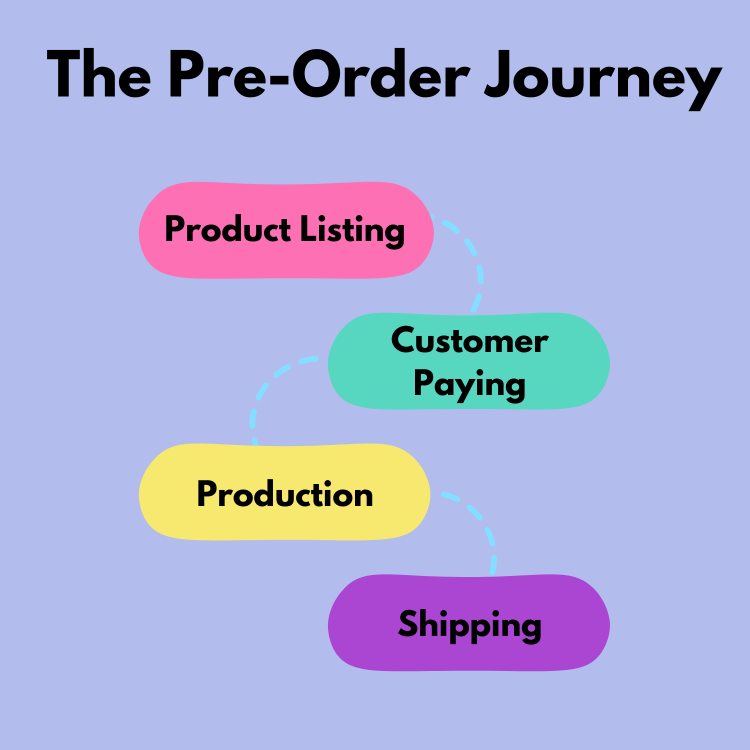
The process for pre-orders is straightforward:
Example: A multichannel seller on Shopee, Lazada, and Amazon launches a pre-order for a trending phone case design. They collect 200 orders across all platforms over 5 days, then place a single bulk order with their Guangzhou supplier, paying less per unit than if they’d ordered speculatively. The lead time from order to delivery is 10 days.
Many sellers confuse pre-orders with backorders, but they serve different purposes:
| Pre-Order | Backorder | |
|---|---|---|
| Timing | Before product exists or is in stock | After product sells out |
| Customer expectation | Knows they’re buying something upcoming | May not realise item is out of stock |
| Seller control | Planned, you choose to offer it | Reactive, happens when you run out |
| Risk level | Lower (you control the timeline) | Higher (customers already expect delivery) |
| Best for | New product launches, seasonal items, limited editions | Unexpected demand spikes, supply chain delays |
Actionable Insight: If you frequently deal with backorders, it’s a sign your demand forecasting or safety stock levels need adjustment. Pre-orders are the proactive alternative.
Sellers also confuse pre-orders with made-to-order and dropshipping models. Here’s how they differ:
| Pre-Order | Made-to-Order | Dropshipping | |
|---|---|---|---|
| Production | Batch production after pre-order window closes | Individual production per order | Already manufactured, held by supplier |
| Inventory held | No (until stock arrives) | No (never held) | No (never held) |
| Customisation | None or limited | High (sizes, colours, engravings) | None |
| Typical wait time | 7-30 days | 2-6 weeks | 3-14 days |
| Best for | Product launches, trending items | Custom/artisan products | Testing new products, low-capital sellers |
| Margin | High (bulk pricing) | High (premium pricing) | Low (supplier takes a cut) |
For sellers who handle a mix of pre-order and ready-stock products, keeping accurate bookkeeping across these different fulfilment models is essential, revenue recognition timing differs for each.
Pre-orders are more than a marketing tactic, they’re a core inventory strategy for modern ecommerce sellers. Here’s why:
Pre-orders let you collect revenue before you pay your supplier, a massive advantage for sellers sourcing from China or other overseas manufacturers. Instead of tying up $5,000-$10,000 in speculative inventory, you use pre-order revenue to fund the purchase order.
Example: A Lazada seller pre-orders a new wireless earbuds model for 2 weeks before supplier delivery. They collect 150 orders at $29 each ($4,350), which covers the bulk purchase cost of $3,200. The remaining $1,150 is profit locked in before the product even ships.
Actionable Insight: Pre-order revenue should be recorded as a liability (unearned revenue) until the product ships, not as income. If you’re selling across multiple marketplaces with different payout schedules, use our ecommerce bookkeeping guide to get the accounting right from day one.
Pre-orders are the most accurate form of demand validation, real customers putting real money down. By tracking pre-order volumes, you can adjust purchase quantities to match actual demand rather than guessing.
Example: A multichannel seller lists a new phone case design on both Shopee and their Shopify store. After 5 days, Shopee has 180 pre-orders and Shopify has 40. They order 250 units (with 10% buffer for returns and future orders) instead of the 500 they would have ordered blindly.
Pre-orders build anticipation and create a sense of exclusivity. On platforms like TikTok Shop, sellers combine pre-orders with live selling to drive urgency, showcasing samples during a livestream and taking pre-orders in real-time.
Example: A beauty seller on TikTok Shop Live demonstrates a new serum, offers a 15% early-bird pre-order discount, and collects 300 orders in a single 2-hour session.
Holding too much inventory ties up capital and increases storage costs, while too little risks stockouts and missed sales. Pre-orders eliminate guesswork by aligning inventory with actual demand. For products with steady demand outside of pre-order windows, an EOQ calculator can help you find the order quantity that minimises total holding and ordering costs.
Example: A seasonal seller uses pre-orders for Chinese New Year gift sets. They sell exactly 500 sets via pre-order across Shopee, Lazada, and their own site, avoiding the 200+ unsold units they had the previous year when they ordered based on estimates.
Being first to market with trending products gives you a ranking advantage on marketplaces. A pre-order listing that collects early orders and reviews will outrank competitors who wait until stock arrives to list.
Example: A seller spots a trending product at the Canton Fair and immediately lists it for pre-order on Shopee with a 3-week delivery window. By the time competitors have stock, they already have 50+ orders and reviews, securing a higher search position.
Each marketplace handles pre-orders differently. Here’s how to set them up on the platforms most commonly used by multichannel sellers in 2026.
Shopee has a built-in pre-order feature that’s widely used across Southeast Asia. When creating or editing a listing:
Key limitations for 2026: Shopee caps pre-order processing at 7 days in Singapore and Malaysia, and up to 15 working days in other SEA markets (Philippines, Thailand, Vietnam, Indonesia). If your lead time is longer, you’ll need to manage customer expectations via listing descriptions. Shopee pre-order items also rank lower in default search results compared to ready-stock items, so factor this into your visibility strategy.
Shopee-specific tips:
Lazada’s pre-order setup is similar:
Key consideration: Lazada has strict shipping SLAs. If you exceed the promised delivery window, you’ll face penalties and potential order cancellations. Always add 2-3 days buffer to your estimates.
TikTok Shop supports pre-orders with extended dispatch timelines:
Unique advantage: TikTok’s algorithm rewards engagement. A live selling session that generates lots of comments and shares will boost your pre-order listing’s visibility.
Amazon has a structured pre-order system, primarily used for media, electronics, and branded product launches:
Key rules for Amazon pre-orders:
Unique advantage: Amazon’s delayed charge model reduces cancellations, customers don’t feel the financial commitment until the item ships. For sellers comparing platforms, see our Shopify vs Amazon guide for a detailed breakdown of fees and features.
Shopify doesn’t have native pre-order support, but several apps make it easy:
Tip: When selling pre-orders across both Shopify and marketplace channels, use OneCart to sync pre-order quantities across all platforms and prevent overselling.
The biggest risk with pre-orders is overselling, taking more orders across all your channels than your supplier can deliver. This is especially dangerous for multichannel sellers.
Example: You list a product for pre-order on Shopee, Lazada, and your Shopify store with a limit of 500 units. Shopee sells 300, Lazada sells 150, and Shopify sells 100, that’s 550 orders against 500 units. Now you have 50 unhappy customers and potential marketplace penalties.
The solution: Use a centralised inventory management tool like OneCart that syncs stock counts across all platforms in real-time. When a pre-order comes in on Shopee, available quantities decrease on Lazada and Shopify automatically.
Transparency is critical. Set clear policies and display them prominently:
Actionable Insight: Add your pre-order policy as a pinned comment on your marketplace listing. This reduces customer enquiries by 30-40% and shows Google/marketplace algorithms that your listing has active engagement.
The single most expensive mistake we see in pre-order setups is sellers running the same pre-order policy across every channel. The platforms charge customers at different points, cap delivery windows differently, and treat late shipment differently. Run the wrong window on the wrong platform and you can dent your seller-tier status fast.
The table below summarises the shape of the rules across the major SEA and global marketplaces. The exact thresholds, fees, and window caps change frequently and several are only visible inside each platform’s Seller Centre, so treat this as a planning guide and confirm the current numbers in your seller dashboard before launching a campaign.
| Platform | Charge Timing | Pre-Order Window | Late Shipment Consequence | Pre-Order Badge |
|---|---|---|---|---|
| Shopee (SEA markets) | At checkout | Extended Days-to-Ship (DTS), varies by market | Counts toward your Late Shipment Rate and seller-tier score; persistent breaches can drop ranking or suspend listings. Check Seller Centre → Performance. | “Pre-Order” badge auto-shows when DTS is extended |
| Lazada (SEA markets) | At checkout | Extended DTS, longer for cross-border than local | Late dispatch and cancellations feed your fulfilment KPIs and can carry fees. Verify in Seller Center → Performance. | “Pre-Order” tag on the listing |
| TikTok Shop | At checkout | Extended dispatch time, varies by market | High late-dispatch and cancellation rates downgrade your store; live limits sit in Seller Center → Performance. | Auto-displayed when dispatch is extended |
| Amazon (.com / .co.uk / .sg) | At ship, not checkout | Up to ~90 days before release; ship within the published window after release | Failed pre-orders risk ASIN suppression and account-health flags. | “Pre-order” button replaces “Add to Cart” |
| Shopify (native + apps) | Configurable: full charge, deposit, or charge-on-ship | You set your own SLA; apps extend to long horizons | None platform-imposed, you set and own the service promise | Requires a pre-order app or theme |
Key takeaway: Amazon is the only major platform that charges at ship, which reduces customer cancellation friction but delays your cash-flow benefit. On every other platform you collect cash at checkout, which is exactly the working-capital lever pre-orders give you.
Actionable Insight: When you list the same SKU on multiple marketplaces, set the shortest marketplace’s DTS as your operational SLA. If one channel caps you tighter than another, plan to ship everything to the tighter deadline. Otherwise you’ll sail past the strict channel’s cut-off while still feeling within the looser one, and lose seller score on the channel you can least afford to.
This is where most small ecommerce sellers get the books wrong, and it matters because pre-order cash is not yet your revenue, it’s a customer prepayment, recorded as a liability until you ship the goods. Get it wrong and you’ll over-report income, under-pay tax in the wrong period, and find your management accounts unreliable for cash decisions.
The treatment is the same in IFRS 15 (used in Singapore, Malaysia, the Philippines, the UK, and most of Asia-Pacific) and ASC 606 (US GAAP): revenue is recognised when control of the goods transfers to the customer, i.e., at shipment, not at checkout.
If you take pre-orders on Shopify and keep your books in Xero, our Shopify Xero integration guide covers which fields the native connector syncs and which it does not, because a prepayment that lands in your accounts as income is precisely the error this section is warning about.
Step 1, Customer pays (pre-order placed):
| Account | Debit | Credit |
|---|---|---|
| Bank / Marketplace Receivable | S$1,000 | |
| Deferred Revenue (Liability) | S$1,000 |
Step 2, Stock arrives, you ship the order:
| Account | Debit | Credit |
|---|---|---|
| Deferred Revenue (Liability) | S$1,000 | |
| Sales Revenue | S$1,000 | |
| Cost of Goods Sold | S$650 | |
| Inventory | S$650 |
Step 3, Customer cancels before shipment (refund):
| Account | Debit | Credit |
|---|---|---|
| Deferred Revenue (Liability) | S$1,000 | |
| Bank / Marketplace Payable | S$1,000 |
The principle: cash in is not revenue until you ship. Many sellers using basic spreadsheet bookkeeping treat the marketplace payout as revenue on the date received, which inflates income in the pre-order month and crashes it in the shipment month, making margins look volatile and breaking forecast accuracy.
Singapore (GST 9% from 2024): Per IRAS, the time of supply for goods is the earlier of: (a) when the goods are delivered or made available, or (b) when payment is received. Pre-orders typically trigger GST at the date of customer payment, not at shipment. This means you owe output GST in the same quarter the customer paid, even though you haven’t yet shipped or recognised revenue. Track this carefully, the timing mismatch between accounting revenue (at ship) and GST output (at payment) catches many small sellers off guard during audits.
Malaysia (SST): Sales tax is generally triggered at invoice issuance or payment receipt (whichever is earlier) for taxable goods. For pre-orders, this means the SST liability arises at checkout.
Philippines (VAT 12%): Per the BIR, VAT on goods is triggered at the time of issuance of the official receipt. For pre-orders paid via marketplace, the OR is typically issued at order confirmation, meaning VAT is owed on pre-order revenue in the period it’s received.
Thailand (VAT 7%) and Vietnam (VAT 8-10%): Both typically follow the “earlier of payment or delivery” rule, meaning pre-order payments trigger VAT immediately.
UK (VAT 20%) and EU: For B2C goods, the tax point is generally the earlier of payment or delivery. Pre-orders trigger VAT at the date of payment, so the seller’s VAT return for that quarter must include pre-order revenue even if the goods haven’t shipped.
United States: Sales tax treatment varies by state. In economic-nexus states (most of the US since Wayfair), pre-order payments typically trigger sales tax collection at the point of charge. Amazon’s “charge at ship” pre-order model conveniently aligns the sales tax trigger with the shipment date.
Actionable Insight: Open a separate ledger account called “Pre-Order Liability” or “Customer Deposits, Pre-Orders” so your accountant can see at any point how much of your bank balance is not yet earned. If you raise external financing, lenders will want to see this breakdown, Wayflyer, Clearco, and the SEA marketplace lenders (Shopee Capital, Lazada CashMy) all underwrite based on recognised revenue, not cash collected. For a fuller treatment, see our ecommerce bookkeeping guide and ecommerce accounting guide.
Most sellers don’t realise their order management system needs to flag pre-order line items distinctly so the bookkeeping software can post them to the right account. If every order hits “Sales Revenue” automatically, your books will be wrong by default. Set up your OMS or accounting integration (Xero, QuickBooks, MYOB) to:
PRE-ORDER flag at listing creation.If your accounting integration can’t distinguish pre-orders from regular orders, you’ll need to run a manual journal at month-end to reverse mis-posted revenue.
Pre-orders shine brightest around the SEA mega-sale events (11.11, 12.12, 9.9, 6.6, 3.3) and global ones (BFCM, Cyber Monday, CNY) where stockup horizons stretch beyond your usual lead time. Done right, pre-orders let you accept demand 4-6 weeks ahead of stock landing, ride the algorithmic boost from early order velocity, and avoid the disastrous post-event return wave that comes from rushing inferior stock.
| Event | Open Pre-Orders | Close Pre-Orders | Ship-By |
|---|---|---|---|
| CNY (varies, 2026: Feb 17) | 6 weeks ahead (early Jan), factor 8-10 weeks of factory shutdown around CNY | 2 weeks ahead | T-3 days for gifting use |
| 3.3 (Mar 3) | 4 weeks ahead (early Feb) | 1 week ahead | T-2 days |
| 6.6 (Jun 6) | 5 weeks ahead (early May) | 10 days ahead | T-2 days |
| 9.9 (Sep 9) | 5 weeks ahead (early Aug) | 10 days ahead | T-2 days |
| 11.11 (Nov 11) | 6-8 weeks ahead (mid-Sep), peak event, longest stockup | 10 days ahead | T-3 days for hero SKUs |
| 12.12 (Dec 12) | 5 weeks ahead (early Nov) | 10 days ahead | T-2 days |
| Black Friday / Cyber Monday (late Nov) | 6-8 weeks ahead (early Oct) | 10 days ahead | T-3 days |
| Boxing Day / Year-End (Dec 26-31) | 4 weeks ahead (late Nov) | 10 days ahead | T-2 days |
Why open this early? Marketplace algorithms reward cumulative order velocity in the run-up to events. A listing with 200 confirmed pre-orders going into 11.11 will out-rank a fresh listing with zero history, even if the fresh listing has more inventory available on the day. Pre-order velocity is your launch ramp.
PRODUCT-RS and PRODUCT-PO) and link them as variants if the platform allows.Most SEA sellers running pre-orders source from China. Use these realistic lead times for stockup planning:
| Origin → Destination | Air Freight | Sea Freight | Cross-Border Marketplace (e.g. Shopee International Platform) |
|---|---|---|---|
| Guangzhou → Singapore | 5-7 days | 12-18 days | 7-12 days |
| Yiwu → Kuala Lumpur | 6-8 days | 14-21 days | 7-12 days |
| Shenzhen → Manila | 5-8 days | 16-22 days | 10-15 days |
| Shenzhen → Bangkok | 5-7 days | 14-20 days | 8-14 days |
| Shenzhen → Jakarta | 6-9 days | 18-25 days | 10-18 days |
| Shenzhen → Ho Chi Minh City | 4-6 days | 10-14 days | 7-12 days |
Add +5-7 days during CNY (late Jan to mid-Feb) and Golden Week (early October) for factory shutdown. For a deeper breakdown of seasonal procurement timing, see our seasonal inventory guide.
There is no single “good” pre-order conversion rate, it swings widely by category (limited-edition collectibles convert far harder than everyday home goods) and by how warm your audience is. Rather than chase a borrowed benchmark, set your own baseline from your first one or two campaigns and watch the direction of travel. The metrics that actually tell you whether a pre-order campaign is healthy:
Actionable Insight: When pre-order conversion is weak, the fix is almost always trust signals, not a bigger discount. Add an “as seen on” mention if you have one, a pinned comment showing past pre-order success (“last drop sold out in 6 hours”), and a clear refund and delivery policy in the first product image. Discounting a low-trust pre-order does not fix the trust problem, it just amplifies the loss when conversion is already weak.
Marketplace customers have high expectations. Shopee buyers expect delivery within the pre-order window, miss it, and you’ll face cancellation requests, bad reviews, and penalty points. Every missed window also drags down your on-time delivery rate, the metric platforms use to score how dependably you ship.
Rules of thumb for setting pre-order windows:
| Sourcing Method | Suggested Pre-Order Window | Buffer |
|---|---|---|
| Local supplier (same country) | 3-5 working days | +2 days |
| Cross-border (China → SEA) | 10-15 working days | +3-5 days |
| Custom/manufactured goods | 20-30 working days | +5-7 days |
Always factor in your lead time, total time from placing the order with your supplier to having stock ready to ship.
Incentivise early purchases with tiered or time-limited pricing:
Example: A seller launches a new travel organiser at $15.90 pre-order price (regular $21.90) for the first week on Shopee. They collect 280 orders at the lower price, lock in a bulk rate with their supplier, and still make $4.50 profit per unit, with zero risk of dead stock.
Managing pre-orders manually across multiple platforms is a recipe for overselling and missed shipments.
Track pre-order metrics to improve future campaigns:
Use sales reports to track pre-order performance alongside regular inventory sales. To capture these figures in a consistent format each week, our free sales report template lets you break the rows down by platform and calculates margin and share of revenue for each one.
The most common and most damaging mistake. You accept 500 pre-orders across 3 platforms but your supplier can only deliver 400 units.
Why it happens: Selling on multiple platforms without centralised inventory tracking. Each platform shows separate stock counts that aren’t connected.
How to avoid it:
Sellers often promise delivery based on best-case supplier timelines, then face delays from customs, quality issues, or holidays (Chinese New Year, Golden Week, etc.).
How to avoid it:
Customers who pre-order expect more communication than regular buyers. Radio silence between purchase and delivery creates anxiety, support tickets, and cancellation requests.
How to avoid it:
Each platform has different rules for pre-orders. Shopee limits processing time to 7-15 days. Lazada has strict shipping SLAs with financial penalties. TikTok Shop flags listings with high cancellation rates.
How to avoid it:
If customers get no benefit from pre-ordering (waiting weeks for the same price), they’ll simply wait for ready stock. You’ve added risk with no reward.
How to avoid it:
A pre-order is when a customer purchases a product before it’s available for immediate delivery. The seller collects payment (or a deposit), then ships the item once stock arrives, typically within 7-30 days depending on the platform and sourcing method. Pre-orders let sellers validate demand and fund inventory purchases with upfront revenue.
On Shopee, you enable pre-orders in the product listing settings by toggling the Pre-Order option and setting a processing time (up to 7-15 working days depending on your market). Shopee displays a “Pre-Order” badge on your listing. Customers pay at checkout, and you ship within the processing window. Exceeding it triggers penalties.
A pre-order is planned, you deliberately list a product before stock arrives to gauge demand. A backorder is reactive, a product sells out unexpectedly and you take orders for the next restock. Pre-orders give you control over timing and expectations; backorders often frustrate customers who expected immediate delivery.
Yes, but you need centralised inventory management to avoid overselling. When you accept a pre-order on Shopee, the available quantity must decrease on Lazada, TikTok Shop, and Shopify simultaneously. Tools like OneCart handle this automatically by syncing stock counts across all connected platforms.
Start with your supplier’s minimum order quantity (MOQ), learn more in our MOQ guide. Set your pre-order cap at 90% of your confirmed supplier allocation. If pre-orders exceed that cap, either negotiate a larger order with your supplier or close the pre-order campaign. Use a reorder point calculator to determine when to transition from pre-order to regular inventory replenishment.
Communicate immediately with your customers. Send an update explaining the delay, provide a revised delivery date, and offer a goodwill gesture (small discount, free shipping on next order). On marketplaces, contact seller support to request a delivery window extension before the deadline passes. Transparency prevents cancellations, most customers will wait if they know what’s happening.
Pre-orders can be more profitable for small sellers than for large ones. You avoid tying up capital in unsold inventory, you can negotiate better bulk rates by knowing exact quantities, and you eliminate the risk of dead stock. The key is managing customer expectations and delivery timelines carefully. For a deeper look at keeping your pre-order finances in order, see our ecommerce bookkeeping guide.
On Amazon, pre-orders work differently from most marketplaces. Customers place their order but are not charged until the item ships. Products can be listed for pre-order up to 90 days before the release date. Amazon’s “Pre-order Price Guarantee” automatically gives customers the lowest price offered between the order date and release date, which reduces cancellations. All pre-order sales count toward Best Seller Rank (BSR) on launch day, a powerful way to boost early visibility.
Pre-orders and dropshipping both let you sell without holding inventory upfront, but they serve different purposes. Pre-orders are best for product launches and trending items where you want to gauge demand before committing to a bulk order, you collect payments, then place one large purchase order at a better per-unit price. Dropshipping is better for testing a wide range of products with minimal risk, but margins are thinner because the supplier handles fulfilment. Many sellers start with pre-orders for their hero products and use dropshipping to test new categories before committing inventory. If you’re comparing platforms for either model, our Shopify vs Amazon comparison covers the key differences.
Pre-order cash is a customer prepayment, not revenue, until you ship. In Xero or QuickBooks, create a current liability account called “Deferred Revenue, Pre-Orders” (or “Customer Deposits”). When the marketplace pays out pre-order proceeds, record them as a credit to that liability account, not to Sales. When you ship the order, post a journal: debit Deferred Revenue, credit Sales Revenue (and a separate entry for COGS and Inventory). At month-end, the Deferred Revenue balance should equal unshipped pre-order count × average pre-order price, that’s your reconciliation check. Get this right under IFRS 15 / ASC 606 and your management accounts stop swinging wildly between pre-order and shipment months.
There is no single benchmark that fits every seller. Conversion swings widely by category (limited-edition collectibles convert far harder than everyday home goods) and by how warm your audience is, so a borrowed industry figure tells you little. Set your own baseline from your first one or two campaigns and track the direction of travel from there. If conversion is weak, the fix is almost always trust signals rather than a bigger discount: add social proof, a pinned policy comment, and clear delivery promises in the first product image before you discount further.
Open pre-orders 6-8 weeks before the event for 11.11 and BFCM. Marketplace algorithms reward cumulative order velocity in the run-up to mega-sale events, so a listing with 200 confirmed pre-orders going into 11.11 will out-rank a fresh listing with zero history even if both have the same inventory. Close the pre-order window 10 days before the event so you have time to ship hero SKUs by T-3. For Chinese New Year (Feb 17 in 2026), open even earlier, 6 weeks ahead, because factory shutdowns add 8-10 weeks to your sourcing window.
Yes, but only if you’ve placed your supplier purchase order before the shutdown begins (typically 2 weeks before CNY itself, so late January to early February). During the shutdown (~3 weeks for most factories, 6+ weeks for some), nothing new can be produced, but stock that’s already manufactured can still ship via cross-border marketplaces or pre-positioned warehouses. The trick is to advertise pre-orders with delivery dates that fall after factory reopen + lead time + shipping, not optimistic dates you can’t meet. See our seasonal inventory guide for the full pre-CNY procurement calendar.
Ready to manage pre-orders across all your sales channels? OneCart syncs inventory, orders, and fulfillment across Shopee, Lazada, TikTok Shop, Shopify, and more, so you can take pre-orders confidently without the risk of overselling. Platforms supported include Amazon, eBay, WooCommerce, Qoo10, and 50+ others. Start your free trial today.
OneCart's Item Master keeps stock levels in sync across every marketplace you sell on, automatically.
Try OneCart freeUsed by hundreds of merchants in Singapore & Southeast Asia