How to Sell on Shopee: A Guide to Your First Sale [2025]
Learn how to sell on Shopee with this practical guide. Get actionable tips on listing products, managing your store, and boosting sales in Singapore.
Learn how to sell on Shopee with this practical guide. Get actionable tips on listing products, managing your store, and boosting sales in Singapore.
Getting started on Shopee is your ticket to one of Southeast Asia’s biggest online marketplaces. The good news? You can get your store registered, verified, and have your first product up in less than an hour. The process involves setting up your account, picking the right shop type for your goals, and getting through a quick verification.
Before you even think about your first product listing, it’s worth taking a moment to understand just why Shopee is such a powerhouse in Singapore. Its seamless interface, relentless marketing, and slick, integrated logistics have made it the default shopping destination for millions.
The numbers back it up. Shopee is, by a huge margin, the top e-commerce platform in Singapore. Back in 2022, Shopee pulled in roughly 53% of Singapore’s total e-commerce Gross Merchandise Value (GMV). With the whole market projected to shoot past $10 billion by 2025, that’s a massive, hungry audience you get direct access to.
Your first real decision on this journey is picking the right seller account type. Each option caters to different sellers, from someone clearing out their closet to a full-fledged, established brand. Nailing this choice from the get-go means you’ll have the right features at your fingertips and won’t run into compliance headaches later.
Here’s a simple breakdown of your main choices in Singapore:
Actionable Insight: Start as an Individual Seller. It’s the quickest path to getting your products online. As your business grows, you can easily upgrade to a Business account without losing any of your hard-earned shop ratings or sales history. This lets you test the market with minimal paperwork.
To make the choice crystal clear, here’s a quick comparison:
| Account Type | Best For | Key Requirements | Primary Benefit |
|---|---|---|---|
| Individual Seller | New entrepreneurs, casual sellers, freelancers, or those selling pre-loved items. | Valid phone number and NRIC/FIN for verification. | Fast and simple setup to start selling immediately. |
| Business Seller | Registered businesses and companies with an ACRA registration number. | ACRA business registration details and company information. | Professional branding and access to business-specific tools. |
| Shopee Mall Seller | Official brand owners and authorised distributors (invitation-only). | Strict criteria for product authenticity, brand registration, and service standards. | Maximum visibility, customer trust, and access to exclusive campaigns. |
Picking the right one depends on where your business is today. Remember, you can always evolve your account as your brand grows. For a deeper dive into how fees differ between these accounts, check out our detailed guide on Shopee seller fees.
The sign-up process itself is simple. You can do it right from the Shopee app or their website using your mobile number, email, or by linking a social media account.
Once you’re in, you’ll need to complete your shop profile. This is your chance to make a good first impression, so pick a catchy shop name, write a compelling short description, and upload a sharp logo or profile picture.
The last step is verification. For individual sellers, this usually involves uploading a clear photo of your NRIC or FIN. If you’re registering as a business, you’ll need to provide your ACRA registration details. Shopee’s team is efficient, and you can expect approval within a few business days.
As soon as that approval email hits your inbox, your shop is live. It’s time to create your first listing and start selling.
Think of your product listing as your digital storefront. It’s your silent salesperson, working 24/7. Getting it right is about building an experience that turns a casual browser into a confident buyer. Mastering this is a non-negotiable step in learning how to sell on Shopee successfully.
Your goal is to anticipate and answer every single question a customer might have. A detailed, visually appealing, and genuinely informative listing builds trust. And trust is what stops shoppers from abandoning their carts.
The first thing a shopper sees is your product title. It has to be clear, descriptive, and filled with the exact keywords real people are typing into the search bar. Put yourself in their shoes. Are they searching for a “black cotton t-shirt” or just a “shirt”? Specificity wins.
A solid title formula usually includes:
Practical Example: A title like “AuraSound - ProBeat Wireless Bluetooth Earbuds - Noise Cancelling with 24-Hour Battery - Black” is far more effective than “Cool Earbuds for Sale.” It provides all the key information upfront.
The product description is where you seal the deal. Translate specs into benefits. Instead of just saying “5000mAh battery,” explain what that means: “all-day power for work and travel without needing to recharge.” Use bullet points and keep paragraphs short. People scan, they don’t read essays.
Pro Tip: Front-load your description. Start with a punchy one-sentence summary, follow up with bulleted key benefits, and then dive into the detailed specs. Most shoppers skim, so make those first few lines count.
On Shopee, your photos and videos do all the heavy lifting. Shoppers can’t touch or feel your product, so your visuals need to bridge that sensory gap. Grainy, poorly lit photos suggest an unprofessional seller and will kill a sale in a heartbeat.
Invest the time to get clean, bright, and clear images.
For listings that truly pop, figuring out how to take professional product photos can be a game-changer for your conversion rates.
A Stock Keeping Unit (SKU) is a unique code you give to each product and its variations. This sounds technical, but getting your SKU system right from day one is absolutely crucial for staying organised, especially as your store grows.
Keep it simple and logical. For example, a SKU for a blue, large t-shirt from your “Urban” collection could be URBAN-TS-BLU-L. At a glance, you know the collection, product type, colour, and size. This simple system prevents mix-ups and makes stock-taking a breeze.
When it comes to pricing, your best friend is research. Hop onto Shopee, search for products like yours, and see what your top competitors are doing. You don’t always have to be the cheapest, but your price has to make sense in the market. Tally up your costs, factor in Shopee’s fees, and decide on a profit margin that works for you.
And don’t forget to use Shopee’s promotional tools. Things like discount vouchers or bundle deals create a sense of value and urgency without forcing you to permanently drop your prices. If you want to dive deeper into boosting sales, our guide on 10 things to get more sales from your product listing has some great advanced tips.
Once your product listings are live and catching shoppers’ eyes, the real work begins. Your focus has to shift from setting things up to the day-to-day running of your store. This is what truly separates the pros from the hobbyists—building a smooth, reliable daily operational rhythm that keeps customers happy and your store metrics in the green.
This entire flow, from the moment you decide to list a product to managing your stock, is the backbone of any successful Shopee business. This is the basic journey for getting a product ready for sale:
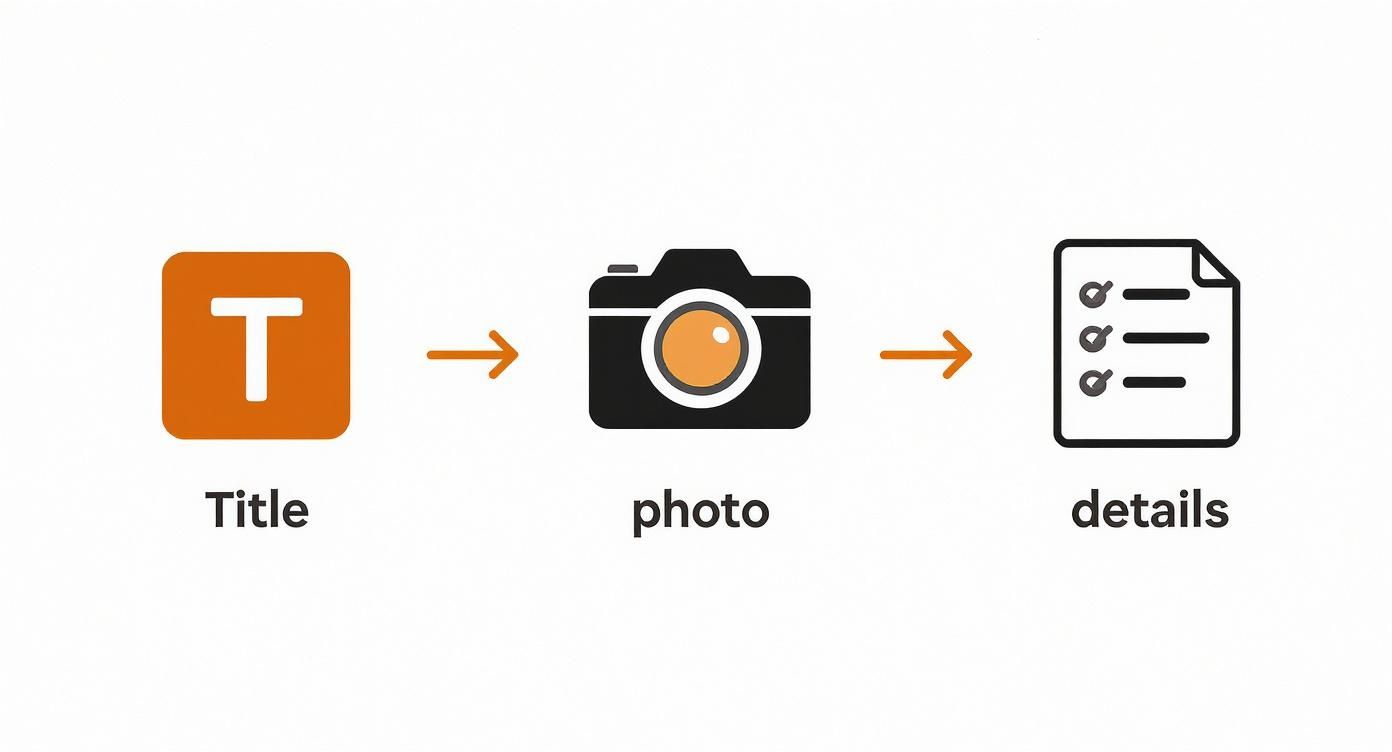
As you can see, it all starts with a compelling title, great photos, and the right product details. Each piece builds on the last to give a potential buyer the full picture, which is what ultimately convinces them to click “Buy Now”.
Nothing kills your store’s reputation faster than overselling. When a customer pays for an item only to find out it’s actually out of stock, you’re looking at a cancelled order, a potential negative review, and a customer who probably won’t come back. Good inventory management is your best line of defence.
The Shopee Seller Centre gives you the basic tools to track stock. When you list a product, you input the quantity you have. Every time one sells, Shopee automatically deducts it.
Relying only on this can get risky, especially if you’re selling on other platforms too. A straightforward manual approach is to do weekly stock takes. Physically count your inventory and compare it against the numbers in your Seller Centre. It’s a great way to catch mistakes before they become problems.
Practical Example: If you sell handmade greeting cards, make it a Sunday habit to count the physical stock for each design and update the numbers on Shopee. This simple routine can prevent a lot of headaches during the week.
As your business picks up, counting stock by hand just won’t cut it. It becomes a massive time sink and is ripe for human error. This is the point where you absolutely need to bring in automation.
Integrating your Shopee store with a multi-channel tool like OneCart centralises your inventory across every single place you sell.
This means when a product sells on Shopee, the stock count is instantly updated not just there, but also on your Lazada, TikTok Shop, or Shopify store. This real-time sync is the secret weapon against overselling when you’re scaling up. To see just how this works in practice, you can learn more about how to sync inventory for Shopee and Lazada and understand the immediate benefits.
The moment an order drops, the clock starts ticking. Getting orders out the door quickly and accurately is a huge factor in your seller rating. Shopee rewards sellers who are fast and reliable.
The fulfilment process itself is direct, but every step needs your full attention:
Actionable Insight: Organise your inventory with a clear labelling system. For example, use bins labelled A1, A2, B1, etc. Then, in your product SKU, add the bin location (e.g., URBAN-TS-BLU-L-A1). This way, you can find and pick orders in seconds, not minutes, which dramatically speeds up packing time and nearly eliminates the chance of sending the wrong item.
By locking down a solid workflow for these daily jobs, you build an operation that can handle more and more orders without breaking a sweat. This operational excellence is a cornerstone of selling on Shopee effectively for the long haul.
Getting your products listed is a huge first step, but you have to get eyeballs on your listings. If you really want to learn how to sell effectively on Shopee, the secret lies in mastering its built-in marketing tools. They’re designed to help you slice through the competition and pull interested buyers straight to your shop.
The competition is intense, but so is the opportunity. Shopee Singapore pulls in around 13.2 million web visits every single month as of mid-2024, making it the top e-commerce destination in the country. You need a solid marketing plan to grab a piece of that action. You can see more data on Singapore’s top e-commerce platforms on Statista.com.
Promotions are your secret weapon for creating a sense of urgency and nudging customers to buy more. Inside the Seller Centre, you’ll find the “Marketing Centre,” which is packed with different tools to create offers that people can’t resist.
Discount Vouchers are a fantastic place to start. You can set up shop-specific vouchers that give a fixed amount off (like “$2 off with a $20 spend”) or a simple percentage discount. This is a classic tactic to get shoppers to add just one more item to their cart to hit that minimum spend, boosting your average order value.
Also, make sure to use Bundle Deals and Add-on Deals. These are brilliant for moving older stock or getting customers to try something new.
When you’re ready to put some money behind your marketing, Shopee Ads are the most direct way to get your products seen by people who are ready to buy. There are two main ad types to get familiar with.
First up are Keyword Ads. These ads place your products right at the top of the search results when a shopper types in a specific term you’re bidding on. If you sell “organic dog treats,” bidding on that phrase means your product is the first thing a potential customer sees.
Then you have Discovery Ads. These ads pop up in places like the “Daily Discover” section on the homepage or on the product pages of similar items. This is perfect for grabbing the attention of browsers who are still exploring and haven’t quite decided what they want yet.
Actionable Tip: When you’re just starting with Shopee Ads, use the “Auto” keyword selection. Shopee’s algorithm will find and test keywords for you. Check back in a week, see which search terms led to sales, and then turn off the ones that didn’t. You can then manually add the successful keywords to a new campaign with more control over the bid.
Making a single sale is great. But building a base of loyal customers who keep coming back for more is how you build a real business. Shopee has some neat tools for creating that direct connection.
The Follow Prize is as simple as it is powerful. You set up a special voucher that’s only offered to people who follow your store. It’s a low-effort way to grow your follower count, which means more of your posts and new products will show up in their feed later on.
Another great tool is Shopee Live. This lets you host live video streams where you can unbox products, show them in action, answer customer questions in real-time, and even drop exclusive deals for your viewers. It builds a sense of community and a personal connection that a static product page just can’t replicate. To make sure your listings are visible in the first place, getting a handle on SEO is crucial. These Search Engine Optimisation Basics for Retailers are a great starting point.
On Shopee, your reputation is everything. It’s the silent factor that nudges a shopper to click “buy now” on your listing over a competitor’s. Building that trust is about proving you’re reliable, time and time again.
Shopee’s algorithm actively rewards sellers who deliver a great experience. The platform keeps a close eye on a few key performance metrics, and when you keep them healthy, you get rewarded with better visibility in search results. Nail these, and you’re building a foundation for long-term growth.
Your Seller Performance score is built on a few core pillars. Think of these as your shop’s report card—keeping these grades up is non-negotiable for anyone serious about succeeding on the platform.
Here’s what Shopee is watching most closely:
A high Chat Response Rate is one of the easiest wins you can get. Aim to reply to all new messages within 12 hours. You don’t need a perfect answer immediately. Even a quick, “Hi, thanks for reaching out! Let me check on this for you and I’ll get back to you shortly” is infinitely better than radio silence.
To give you a benchmark, the top Shopee stores in Singapore are hitting some incredible numbers. Many have tens of thousands of followers and positive feedback ratings above 90%. We’ve seen top sellers in home and living categories with follower counts ranging from 20,000 to over 80,000 and satisfaction ratings between 92% and 99%. You can dig into more data on successful Shopee stores on sellercenter.io to see what the best are doing.
Your performance metrics are the bedrock of your store’s health. Here’s a quick overview of the key metrics Shopee uses to grade sellers and some practical tips for keeping them in the green.
| Performance Metric | What It Measures | Why It Matters | How to Improve It |
|---|---|---|---|
| Chat Response Rate (CRR) | The percentage of new chats and offers you respond to within 12 hours. | Shows buyers you are attentive and builds pre-purchase confidence. High CRR is an easy way to stand out. | Use the Shopee app to get instant notifications. Set up auto-replies for off-hours. Even a quick acknowledgement counts. |
| Late Shipment Rate (LSR) | The percentage of orders shipped after the shipping deadline. | A low LSR signals reliability and efficiency, directly impacting customer satisfaction and your store’s ranking. | Set realistic stock levels. Organise your pick-and-pack process. Ship out orders daily to avoid backlogs. |
| Non-fulfilment Rate (NFR) | The percentage of orders cancelled by the seller or returned/refunded due to seller fault. | High NFR suggests poor inventory management or inaccurate listings, eroding trust and harming your store’s visibility. | Use an inventory management system like OneCart to prevent overselling. Write detailed, accurate product descriptions with clear photos. |
| Shop Rating | The average of all ratings submitted by your buyers. | This is powerful social proof. A high rating directly influences a new customer’s decision to buy from you. | Ship on time, pack items securely, and provide excellent customer service. Encourage happy customers to leave a review. |
Keeping a close eye on these numbers is about actively building a reputation that attracts and retains customers.
No matter how organised you are, things will go wrong sometimes. An item arrives damaged, or a customer has a question post-purchase. Your reaction in these moments is what truly defines your brand and can even build more loyalty than a perfect transaction.
When handling a return or refund request, be swift and professional. Acknowledge their issue with empathy and clearly outline the next steps based on Shopee’s official process.
Practical Example: If a buyer receives a broken item, your response should be immediate: “I’m so sorry to hear your item arrived damaged. Please go ahead and start a return request in the app, and we will process your refund as soon as it’s approved. Thanks so much for your patience.” This simple, empathetic approach de-escalates the situation and shows the customer you have their back.
Positive reviews are pure gold. They act as unbiased testimonials that signal “this store is a safe bet!” to new shoppers. Once an order is completed successfully, don’t be afraid to gently ask for feedback.
A simple, polite note included in your packaging can work wonders. Something like, “Thank you for your order! If you loved your purchase, we’d be so grateful if you could leave us a review on Shopee.” This small reminder can significantly boost your review count, creating a powerful foundation of trust that will attract countless future buyers.
Jumping into a new marketplace like Shopee always brings up a few questions. To get you started on the right foot, we’ve put together answers to the most common queries we hear from sellers just starting their journey.
Think of this as your friendly FAQ to kick things off with confidence.
Getting started on Shopee costs you exactly nothing. You can register your account, set up your shop, and list your products completely free. It’s a fantastic way to dip your toes into e-commerce without any scary upfront investment.
Shopee’s model is simple: they only make money when you do. They take a small commission fee, but only after you’ve successfully sold an item. The exact percentage depends on your seller type and the product category.
While listing is free, you can choose to invest in growth. Optional costs include joining Shopee’s marketing programmes, like the popular Cashback or Free Shipping initiatives that buyers love. You can also put a bit of budget into Shopee Ads to get your products seen by more people. These aren’t mandatory, but they’re powerful levers you can pull to accelerate your sales.
Finding your winning product is half the battle. In Singapore, a few categories are always buzzing with activity and are great places for new sellers to look.
You can’t go wrong exploring these high-demand areas:
Don’t just guess. Use the tools Shopee gives you. A solid strategy is to dive into different categories and check the “Top Products” section. This is a real-time feed of what’s flying off the virtual shelves. Also, take a peek at what your most successful competitors are doing. Can you spot a gap in the market or offer a unique spin on a popular product?
Pro Tip: Don’t just copy the top sellers. Find “shoulder niches.” If everyone is selling high-end mechanical keyboards, you could sell complementary items with less competition, like custom keycaps, ergonomic wrist rests, or stylish desk mats.
Shipping often feels like the most intimidating part of e-commerce, but Shopee has simplified it with their integrated Shopee Supported Logistics (SSL). For new sellers, we highly recommend this.
Here’s how it works: you get an order, you pack it up securely, and you print the official shipping label straight from the Seller Centre. Then, you just drop the parcel off at a designated point or schedule a pickup with one of their partners, like SingPost or J&T Express. Simple as that.
The real win with SSL is the automation and trust it builds. Tracking is updated automatically for both you and your customer, which cuts down on those “Where’s my order?” messages. Plus, Shopee frequently runs shipping promotions through SSL, offering subsidised fees that can make your products much more tempting to buyers.
It’s easy to stumble when you’re starting out. The good news is that most new sellers make the same kinds of mistakes, and knowing what they are is the best way to avoid them.
The most common tripwire is bad presentation. Low-quality photos and lazy, generic product descriptions are the fastest way to lose a customer. Your listing is your digital salesperson—it needs to be sharp, convincing, and clear.
Another killer is slow customer service. Shopee tracks your Chat Response Rate for a reason. Ignoring questions or taking ages to reply not only annoys potential buyers but also tanks your store’s rating and hurts your visibility in search results.
Poor inventory management is a classic. Nothing sours a customer experience like getting an order cancelled because you ran out of stock. It guarantees a bad review and instantly damages your shop’s credibility.
Finally, a lot of beginners just list their products and wait. That’s not enough. You have to be proactive. Use Shopee’s marketing tools—Vouchers, Bundle Deals, and Shopee Ads—to actively drive traffic to your store. Nail these four things—presentation, service, stock management, and marketing—and you’ll be miles ahead of the competition.
Ready to scale your Shopee store without the operational headaches? OneCart centralises your inventory, orders, and listings across Shopee, Lazada, TikTok Shop, and more. Prevent overselling, streamline fulfillment, and manage your entire e-commerce operation from a single, powerful dashboard. Discover how you can save time and grow faster at https://www.getonecart.com.
Automate & Scale Your Online Business with OneCart
Start a Free TrialUsed by hundreds of merchants in Singapore & Southeast Asia