How to Start Selling on Shopee Singapore: Fees & Guide [2026] 2026
Start selling on Shopee Singapore with this 2026 guide. Covers Shopee registration, seller fees, product listings, Shopee Ads, and how to expand to Lazada and TikTok Shop.
Start selling on Shopee Singapore with this 2026 guide. Covers Shopee registration, seller fees, product listings, Shopee Ads, and how to expand to Lazada and TikTok Shop.
This step-by-step guide covers everything you need to start selling on Shopee Singapore in 2026. From registering your seller account and understanding Shopee seller fees (commission, transaction, and service fees) to creating optimised listings, running Shopee Ads, and fulfilling orders — it’s all here. Whether you are launching your first Shopee store or expanding from Lazada or TikTok Shop, follow along to set up, promote, and grow a profitable business on Singapore’s largest marketplace.
Getting a new Shopee store off the ground is exciting, but turning that excitement into actual sales requires a clear strategy from day one. Think of this guide as your high-level roadmap, walking you through the entire process from creating your account to scaling your business. Before we get into the nitty-gritty of how to do everything, it’s important to understand the landscape and the key milestones you need to hit.
First things first: Shopee is the undisputed leader in Singaporean e-commerce. If you want to reach local online shoppers, this is where you need to be.
Shopee’s dominance is built on a massive and seriously engaged user base. As of 2026, the platform commands a whopping 52% of Southeast Asia’s e-commerce gross merchandise value (GMV) and has grown to process over 10 billion gross orders. In Singapore alone, Shopee.sg continues to be the most visited e-commerce platform.
A lot of this success comes from a mobile-first approach that clicks with Singaporean consumers. They have pioneered features like Shopee LIVE (live-stream shopping), which has seen its engagement triple. Shopee’s affiliate programme has also matured in 2026, giving sellers access to a network of content creators who promote products for a commission — a powerful growth lever for new shops.
This powerful mix of market share, user engagement, and integrated services makes it an incredibly attractive place for sellers to build a business.
A successful Shopee business is about building a trusted brand through excellent listings, reliable fulfillment, and proactive customer engagement. Your store’s reputation is your most valuable asset.
This visual breaks down the simple, four-stage journey of a successful Shopee seller.
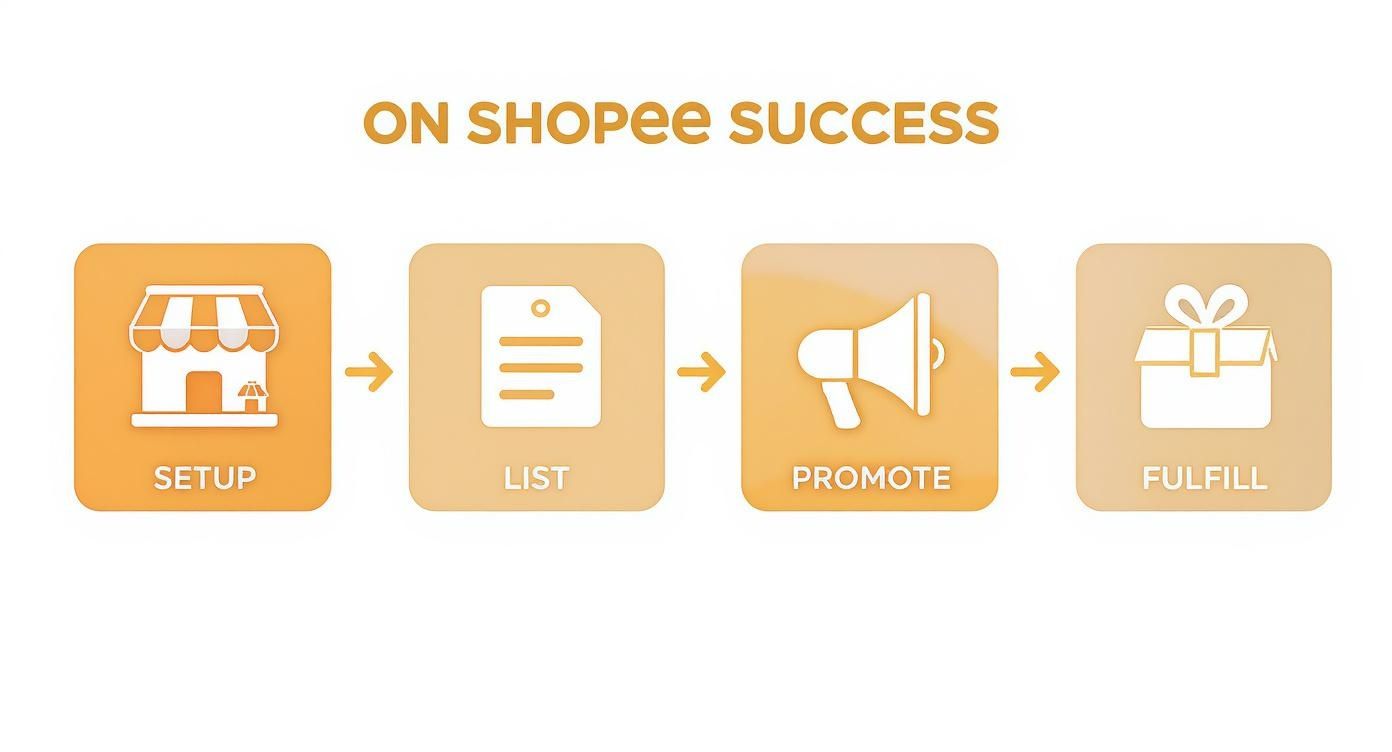
Each step builds on the last. Getting one right strengthens the next, creating a positive cycle of growth and happy customers.
To help you visualise the journey from start to finish, here’s a quick checklist of the essential milestones for any new seller in Singapore.
| Milestone | Key Action | Primary Goal |
|---|---|---|
| Account Creation | Register and verify your seller account. | Establish your official presence on the platform. |
| Store Setup | Complete your shop profile with a logo and description. | Build initial trust and brand recognition. |
| Product Listing | Upload your first 5-10 products with great photos. | Create a foundational product catalogue for buyers to discover. |
| Initial Promotion | Set up a “New Shop” voucher or discount. | Drive your first sales and attract early followers. |
| First Order Fulfilment | Process and ship your first order successfully. | Establish a reputation for reliability and good service. |
This checklist provides a clear path forward, ensuring you cover all the critical bases as you launch your Shopee store.
To get immediate traction, focus on a few critical actions right away. This is about prioritising what delivers the biggest impact at the beginning.
Here’s a practical to-do list to guide your first moves:
These initial steps are all about creating momentum. By focusing on a credible store and attractive listings from the get-go, you are setting the stage for long-term growth. We’ll break down exactly how to execute each of these actions in the sections ahead.
Think of your Shopee store as your digital storefront. Getting the account set up is just the first step; the real goal is to build a shop that customers trust and want to come back to. This initial setup phase is your one chance to make a strong first impression, so it’s worth getting it right from the get-go.
Once you’ve registered on the Shopee platform, the real work begins. This is where you’ll choose a memorable name, create a clean logo, and write a description that tells people exactly what you sell and why they should buy from you. These pieces all work together to build a professional and credible presence.
Your shop name is a massive part of your brand identity. It needs to be easy to remember, simple to spell, and ideally, hint at what you are selling. Steer clear of generic names with random numbers—they look unprofessional.
Your shop logo and cover photo are your visual handshake with customers. You do not need to be a pro designer. A simple, clean logo made with a tool like Canva can be surprisingly effective. For the cover photo, pick a shot that showcases your best products or a lifestyle image that captures your brand’s vibe.
This is your chance to connect with potential buyers. Use the shop description to tell your story, explain what makes your products special, and build that all-important trust. A well-written description can be the final nudge a hesitant customer needs.
Here’s a simple template you can adapt:
“Welcome to [Your Shop Name]! We are a Singapore-based seller passionate about [Your Niche/Product Type]. All our products are [Key Selling Point, e.g., ‘carefully curated for quality,’ ‘handmade with natural ingredients,’ or ‘100% authentic’]. We ship out orders within 24 hours. Follow us for new arrivals and exclusive deals!”
This format works because it quickly answers the big questions: who you are, what you sell, what your unique value is, and what they can expect from you.
The Shopee Seller Centre is your mission control. This is the dashboard where you’ll manage everything—from listings and orders to marketing and finances. It can feel overwhelming at first, but if you focus on a few key areas to start, you will be on the right track.
Get comfortable with these essential sections first:
Just spending an hour clicking through these sections will give you a solid feel for your day-to-day operations. As you grow, you might want to look into how to authorise Shopee to a management tool like OneCart to pull all your workflows from different channels into one place.
Verification is a non-negotiable step that builds huge trust. Shopee requires all sellers to verify their identity to keep the marketplace safe for everyone. The exact documents you will need depends on whether you are an individual seller or a registered business.
For individual sellers in Singapore, you will usually just need your NRIC. If you are a registered business, you will have to submit your ACRA BizFile. The process is straightforward and is a critical part of learning how to sell at Shopee the right way.
Actionable Insight: Filling out your shop profile and getting verified has a direct impact on your store’s credibility and whether a customer decides to trust you with their money. A complete, verified profile is a clear signal that you are a serious and reliable seller.
Once your shop is set up, your product listings become your single most important sales tool. A great listing does more than show what you sell; it’s your silent salesperson, working 24/7 to pull customers in and convince them to hit ‘Add to Cart’. Getting this right is fundamental if you want to succeed on Shopee.

Picture this: a buyer searches for a product on Shopee and is hit with a wall of images and titles. Your job is to stand out from that crowd. It all begins with a title that’s clear, packed with information, and optimised for how real people search.
A weak title is a wasted opportunity. A strong one grabs attention and tells the Shopee algorithm exactly what you are selling, helping you climb higher in the search results. I’ve found a simple formula that works time and time again.
Just follow this structure:
Let’s see it in action. Imagine you are selling noise-cancelling headphones from a brand called “AudioSG”.
The strong title is brimming with keywords, which dramatically increases its chances of being discovered. To really nail this, you need to conduct some effective ecommerce keyword research to understand what terms your customers are actually typing into the search bar.
On Shopee, shoppers cannot touch or feel your product. Your photos and videos have to do all the heavy lifting. Listings with sharp, multi-angle photos and a short video consistently outperform those without. The good news is you do not need a professional studio.
Here are a few simple tips that make a huge difference:
Actionable Insight: Your main image is your first impression. Make it count. It should be a clear, well-lit shot of the product on a clean, uncluttered background. Make the item the hero.
To help you get this right, think of your listing as a series of small optimisations. Here’s a quick checklist comparing weak elements with strong ones that drive search visibility and sales.
| Listing Element | Weak Example (Avoid) | Strong Example (Implement) |
|---|---|---|
| Title | “Nice T-Shirt” | “BrandX Men’s Premium Crew Neck T-Shirt |
| Main Image | Dark, blurry photo on a messy table. | Bright, clear photo on a plain white background. |
| Description | “Material: Cotton.” | “Made from 100% premium cotton for a soft, breathable feel.” |
| Category | “Fashion > Men’s Wear” | “Fashion > Men’s Wear > T-Shirts & Singlets > T-Shirts” |
| Attributes | Left blank. | All relevant attributes filled (Brand, Material, Style, Sleeve Length). |
This table is a blueprint. Consistently applying the “Strong Example” principles will put your listings head and shoulders above the competition.
Your product description is where you close the deal. A good one anticipates a buyer’s questions and answers them upfront, building the confidence they need to buy. Do not just list features—sell the benefits.
Instead of just stating, “Material: 100% Cotton,” try something like, “Made from 100% premium cotton for a soft, breathable feel that keeps you comfortable all day long.” The difference is clear.
Break up your description with clear headings to make it easy to scan. Make sure you cover key details like:
Tapping into local trends also gives you an edge. In Singapore, for example, the biggest categories on Shopee are Home and Living, followed by Beauty, Health, and Personal Care. With Shopee.sg getting around 14.3 million monthly visits, mostly from the 25-34 age group, tailoring your listings to these popular categories can be a game-changer.
Finally, do not overlook the technical details. Choosing the right product category is critical for visibility. If you are selling a phone case, do not just put it under “Mobiles & Gadgets.” Drill down to the most specific sub-category, like “Mobile Accessories > Cases & Covers.” Fill out every single product attribute—brand compatibility, material, colour. This is how Shopee shows your product to the most relevant buyers. If your product has variations like different colours or sizes, set them up properly so customers can easily pick what they want.
For more deep-dive strategies, check out our guide on 10 things to get more sales from your product listing.
Getting shoppers to your product page is one thing; convincing them to click “buy” is another battle entirely. This is where smart pricing and irresistible promotions come into play. Let’s walk through how to set competitive prices, use Shopee’s own marketing tools, and gear up for those massive sales campaigns that every seller in Singapore looks forward to.
First, you need to get your base price right. This means doing a little digital window shopping. A quick search on Shopee for items similar to yours will reveal the going rate. Your goal is to find that sweet spot—a price that’s competitive but does not slash your profit margin to zero.
Speaking of profits, you absolutely have to know your numbers. The final price tag needs to cover a lot more than just what you paid for the product.
Before you set a price, you need to figure out your break-even point. Tally up every single expense tied to that product. This is the only way to ensure each sale puts money in your pocket.
Make sure your calculation includes:
Only when you have a firm grip on these costs can you price your items strategically and run promotions without accidentally losing money. For a deeper dive, it’s a good idea to review a complete guide on understanding Shopee seller fees to make sure your math is spot on.
Shopee’s Marketing Centre is a seller’s toolbox, filled with different tools designed to drive sales. The trick is knowing which tool to use for which task.
Here’s a breakdown of the most useful promotional tools and real-world scenarios for using them:
| Promotional Tool | Best For… | Practical Example |
|---|---|---|
| Discount Promotions | Driving quick sales on specific items or clearing out old stock. | Run a 20% off sale on last season’s T-shirt designs to make way for new inventory. |
| Vouchers | Getting first-time buyers over the line and increasing how much they spend. | Set up a “$5 off with a minimum spend of $50” voucher. This nudges shoppers to add one more item to their cart. |
| Bundle Deals | Boosting your average order value (AOV) by selling multiple items in one go. | Offer a “Buy any 3 phone cases for $25” deal. This can easily turn a single-item purchase into a multi-item sale. |
| Add-on Deals | Cross-selling products that go well together and giving them more visibility. | When a customer adds a digital camera to their cart, you can offer a memory card as an add-on for a special price. |
When you match the right tool to your specific goal, your promotions become powerful, strategic moves to grow your shop.
Big campaigns like 9.9, 11.11, and 12.12 are the Super Bowls of Shopee. These are incredible opportunities to find new customers and hit huge sales numbers, but they demand serious preparation. Success during these events is never an accident.
Shopee’s mega campaigns can make up a huge chunk of a seller’s yearly revenue. If you are not prepared, you are leaving a massive amount of money on the table. The real pros start planning at least four to six weeks out.
Treat each campaign like a project and work through a checklist to make sure you are ready.
Here’s what your campaign prep list should look like:
Having a structured plan for these huge sales is a fundamental part of learning how to sell at Shopee successfully. It’s what separates the casual sellers from the serious ones.
Your shop is live and your listings look great. Now it is time to get people to see them. Waiting for shoppers to stumble upon your products organically is a slow way to build a business. To get real traction and accelerate your growth, you need to dive into Shopee’s advertising and marketing features.
This is what separates casual sellers from serious brands.
Shopee Ads are like paying for a prime spot on the busiest street. You are putting your products right where eager buyers are already looking. It might sound complex, but Shopee has made it surprisingly straightforward. You will mainly be working with two types of ads.
Product Search Ads: This is your bread and butter. When a shopper types something into the search bar, your ad appears at the top of the results. Say you sell “organic dog treats”—you can bid on that exact phrase. When someone searches for it, your product shows up first. It’s effective because you’re catching people who already know what they want to buy.
Discovery Ads: These are different. They pop up in places like the “Daily Discover” section on the homepage or under “You May Also Like” on other product pages. Discovery Ads are perfect for getting your brand in front of people who are browsing for items similar to yours, introducing them to products they did not even know they were looking for.
If you are just starting out, set a small daily budget—maybe $5 to $10 per day—and test the waters with Product Search Ads for one or two of your best-selling items. The key is to be specific with your keywords. Instead of a broad term like “pouch,” bid on something precise like “waterproof running pouch.” This ensures your ad money is spent on the most relevant audience.
Turning on the ads is easy. Making them profitable is the real skill. You will need to get comfortable looking at the data in your Shopee Ads dashboard to figure out what’s working and what is just burning cash.
Keep a close eye on these metrics:
Actionable Insight: Constantly tweak your campaigns to improve your ROAS. If a keyword is getting a ton of clicks but zero sales, pause it. On the other hand, if a keyword has a fantastic ROAS, consider bumping up its bid to get even more sales.
Once you have the hang of the basics, you can dig into more advanced advertising strategies on Shopee’s Seller Education Hub to get the most out of every dollar you spend.
Ads are fantastic for grabbing new customers, but Shopee also gives you a bunch of free tools to build loyalty and encourage repeat business. These help you build a real community around your shop.
Shopee LIVE is a game-changer. You can host live video streams to show off your products in action, answer questions in real-time, and offer special deals only for viewers. A simple stream demonstrating a new kitchen gadget or trying on different t-shirts creates a level of engagement and urgency that a static product photo cannot compete with. Shopee LIVE is part of a broader shift toward social commerce platforms — if you’re exploring where to sell next, that guide covers the full landscape.
The Broadcast feature is your direct line to people who already like your brand. It lets you send messages straight to your shop’s followers. Use it to announce new stock, send out a special voucher code, or give them a heads-up about an upcoming flash sale. It is the perfect way to turn one-time buyers into loyal, repeat customers.
Finally, do not sleep on your Shop Decoration. Use the tools in the Seller Centre to create eye-catching banners and group your products into themed collections. A well-designed shop front looks more professional and helps guide shoppers to your bestsellers and promotions, making your brand feel more established and trustworthy.
Mastering your operations is about creating a solid system for everything, from keeping tabs on stock levels to packing orders with genuine care. It’s about being proactive and sidestepping common issues that can hurt your shop’s standing.
The nightmare scenario for any seller is running out of stock during a massive sales event like 11.11. To avoid this, you need a crystal-clear view of your inventory at all times. Use the Shopee Seller Centre to monitor your stock levels and set up low-stock alerts. This way, you get a heads-up before you run dry. Once you’re scaling across multiple channels, a dedicated ecommerce order management system becomes essential for keeping fulfillment under control.
When an order lands, the clock starts ticking. First, acknowledge it. Then, move on to processing, which means generating and printing the Air Waybill (AWB). This document is your parcel’s passport—it has all the essential shipping details and is non-negotiable for sending anything through Shopee’s logistics partners.
Think of your packaging as part of your brand experience. An item that shows up damaged because it was poorly packed is a fast track to returns, negative reviews, and a serious dent in customer trust.
Use the right materials for the job:
Once everything is packed up, stick the AWB securely onto the parcel. Here in Singapore, you will primarily be working with Shopee Supported Logistics partners like Shopee Xpress and J&T Express. From there, you can either schedule a pickup right from your location or drop the parcel off at a designated point. It’s that straightforward.
Actionable Insight: The single most critical metric to obsess over is your Late Shipment Rate (LSR). Shopee penalises sellers who consistently ship orders late. Your goal should be to keep your LSR as close to 0% as possible to maintain a healthy shop rating and avoid any account limitations.
Even with the tightest processes, returns are part of the e-commerce game. The way you handle them can either rescue a customer relationship or lose it for good. When a return request pops up, respond quickly and professionally, and always keep the conversation within the Shopee platform.
Stick to Shopee’s official process for managing returns. It is there to protect both you and the buyer. By handling these situations with a cool head and empathy, you show you are serious about customer service, which goes a long way in protecting your shop’s reputation. A smooth return process can sometimes turn an unhappy customer into one of your most loyal advocates.
Once your Shopee store is humming along with consistent sales, the natural next step is expanding to other platforms. In Singapore’s e-commerce landscape in 2026, the most successful sellers are not locked into a single marketplace — they sell on Shopee, Lazada, TikTok Shop, and often their own Shopify or WooCommerce store simultaneously.
Relying on a single platform is risky. If Shopee changes its algorithm, raises fees, or suspends your account, your entire revenue stream is at risk. Selling on multiple platforms gives you:
The challenge, of course, is managing inventory and orders across multiple platforms without going mad. Manually updating stock levels on three or four seller centres is a recipe for overselling — which leads to penalties and unhappy customers. You can learn more about this problem in our guide on preventing overselling.
The practical solution is a multichannel listing tool that syncs your inventory, orders, and product data across all your platforms in real time. Instead of logging into three different seller centres, you manage everything from one dashboard.
Actionable Insight: Before expanding to a new platform, make sure your fulfilment processes on Shopee are solid. A Late Shipment Rate below 2% and a Shop Rating above 4.5 indicate you are ready to scale. Rushing to multi-channel before your operations are tight will multiply problems, not sales.
For sellers who also handle their own shipping, our free packing slip template generator helps you create professional packing slips with marketplace-specific details — useful when you are processing orders from Shopee, Lazada, and your own webstore in the same day.
Getting ready to launch your store is exciting, but it is natural for a few questions to pop up. We’ve pulled together the most common ones we hear from new sellers in Singapore to give you the clarity and confidence to get started.
Good news for new entrepreneurs: it is completely free to register and set up your shop on Shopee. You do not pay a cent until you start making sales.
Once the orders start rolling in, Shopee deducts fees from each successful transaction. As of 2026, the main costs are:
For a detailed breakdown, see our full guide on Shopee seller fees. Factor all of these costs into your pricing strategy from the start — this ensures every sale you make is profitable.
The data consistently points to a few powerhouse categories in the Singapore market. Home & Living, Beauty & Personal Care, and various Mobile Accessories are perennial top performers.
Real success comes from finding your niche, offering quality products, and marketing them well. I’ve seen sellers with a beautifully curated selection of unique craft supplies easily outperform a generic electronics store.
Always do your homework. Research your target audience and scope out what your competitors are doing. The goal is to find a gap in the market that your products can fill.
Getting those first few sales is all about building momentum. Kick things off by making sure your listings are top-notch—think crystal-clear, high-quality photos and keyword-rich titles that shoppers are actually searching for. It also helps to set a competitive introductory price to tempt those first few buyers.
Actionable Insight: A fantastic tool to get immediate visibility is the free ‘Boost’ feature in the Seller Centre. It lets you push one of your products to the top of its category search results for a short period. You can use this for free every four hours, so make it part of your routine!
You should also create a “New Shop” voucher to give first-time customers a little extra push to click “buy”. Do not underestimate the power of your own network! Share your new shop link with friends and family on your social media channels to drive that crucial initial wave of traffic.
Absolutely — and most successful Singapore sellers do exactly that. Selling on both Shopee and Lazada gives you access to two different buyer pools and lets you diversify your revenue. The main challenge is keeping inventory in sync so you do not accidentally oversell. A multichannel management tool handles this automatically by updating stock across both platforms in real time whenever a sale is made.
For individual sellers in Singapore, the approval process is usually very quick — often within 24 to 48 hours after you submit your NRIC. Business sellers with ACRA registration may take slightly longer as Shopee verifies the business documents. The key is making sure your documents are clear and legible when you upload them to avoid any delays.
Juggling all these strategies — especially if you are selling on more than just Shopee — can get overwhelming. That is where OneCart comes in. You can centralise your inventory, process orders from Shopee, Lazada, and TikTok Shop all in one dashboard, and get your entire e-commerce operation running smoothly.
Automate & Scale Your Online Business with OneCart
Start a Free TrialUsed by hundreds of merchants in Singapore & Southeast Asia