What Causes a Listing to Break in OneCart?
Understand the key actions that can break the connection between your marketplace listings and OneCart. This article covers which manual changes (like editing SKUs, deleting products, or updating content) can disrupt sync—and how to avoid them with best practices.
Help Article
Last updated Apr 15, 2025
1 min read
🔄 1. Manual Edits on the Marketplace
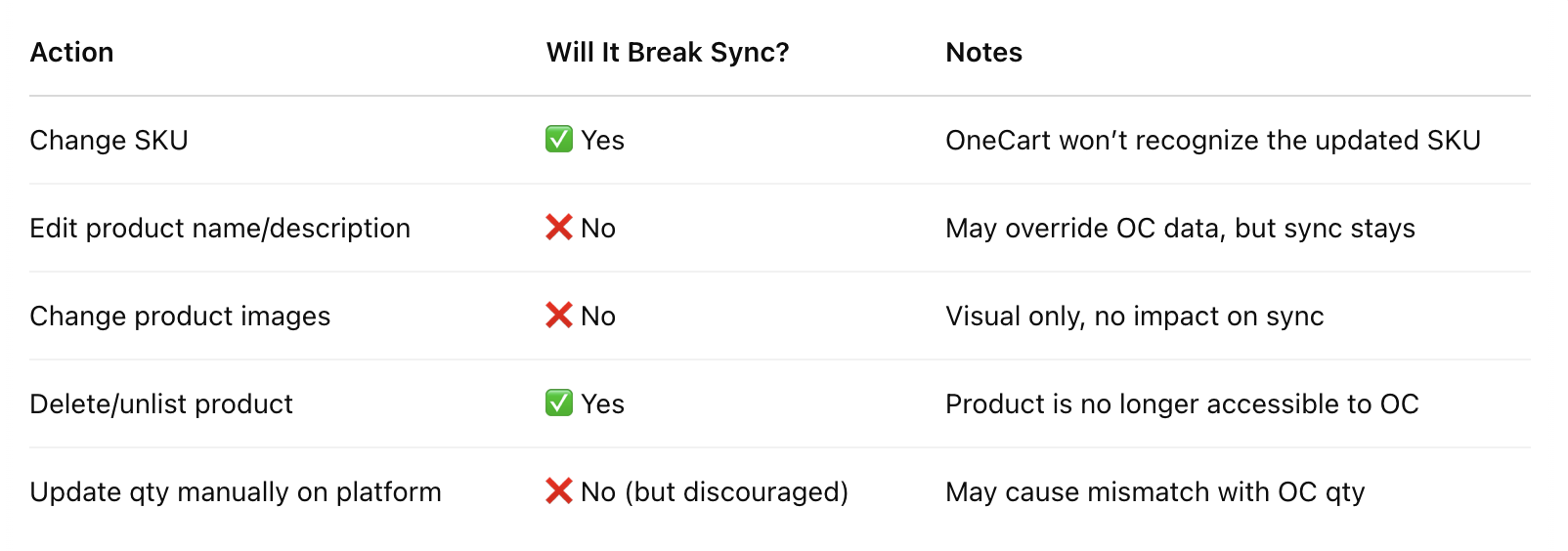
Changing the SKU ➝ ❗️This is the most critical. If the SKU is changed, OneCart may no longer recognize or sync the product correctly.
Deleting the product ➝ OneCart will no longer be able to find or update it.
Unlisting or archiving the product ➝ May cause it to disappear from the active sync list.
🖊️ 2. Changes That Usually Don’t Break the Connection
These don’t usually break the connection, but they can override the info sent by OneCart, which may cause mismatched data (e.g., OC says qty is 10, but platform shows 5 because of a manual change).
✅ Best Practice