Reviews Inbox: Reply to Shopee and Lazada Reviews from One Place
See every product review from your connected Shopee and Lazada shops in one inbox, spot the ones that need a reply, and answer them without opening each Seller Center. Includes AI-suggested replies and reply-rate KPIs.
Help Article
Last updated Sep 12, 2026
5 min read
The Reviews Inbox pulls the product reviews from all your connected Shopee and Lazada shops into one screen. Instead of checking each Seller Center, you see every review that still needs an answer, reply to it from OneCart, and track how well your team is keeping up.
Open it from the left menu under Listings, or go straight to app.getonecart.com/reviews.
What the inbox shows
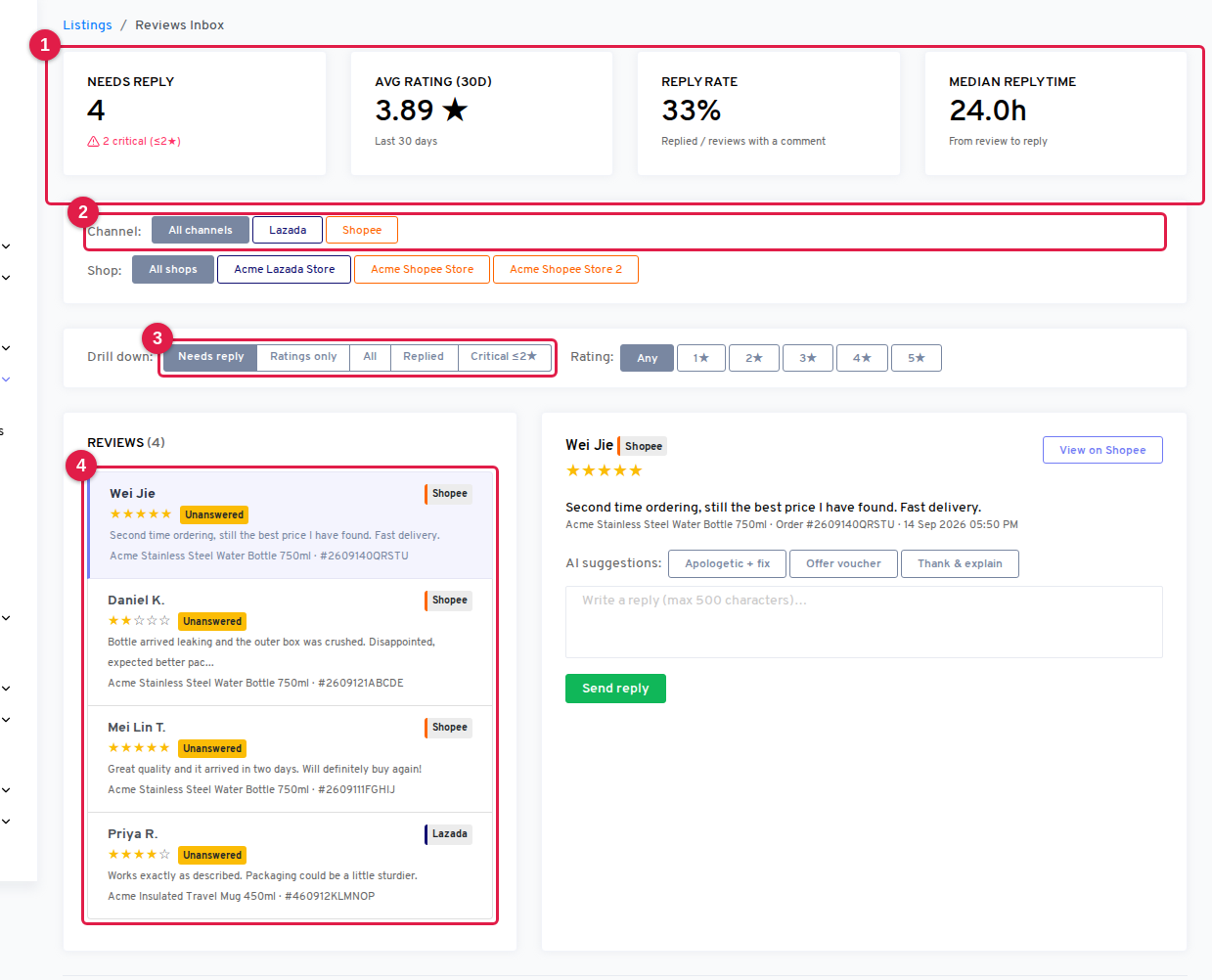
The page has four parts, top to bottom.
- KPI cards (1) summarise the shops you have selected: how many reviews need a reply, your average rating over the last 30 days, your reply rate, and your median time from review to reply.
- Channel and Shop filters (2) narrow the whole page to one marketplace or one shop. The KPIs recalculate for that selection.
- Drill down (3) switches between the review queues and lets you filter by star rating.
- The review list and detail pane (4) show the reviews that match, with the selected review and its reply box on the right.
Which reviews count as “Needs reply”
Most marketplace reviews are just a star rating with no written comment. Marketplaces do not let sellers reply to those, and there is nothing to respond to. So OneCart keeps them out of your way:
- Needs reply shows reviews that have a written comment and no seller reply yet. This is your working queue and the default view.
- Ratings only shows the bare star ratings. You can read them, but there is nothing to reply to.
- Replied shows reviews you have already answered.
- Critical ≤2★ shows every 1-star and 2-star review, including rating-only ones, so a silent bad rating never slips past you.
- All shows everything.
The Needs reply KPI and the Reply rate KPI are calculated over reviews with a written comment only, so rating-only reviews do not drag your numbers down. The small red critical counter under “Needs reply” counts every unanswered 1-star and 2-star review, with or without text.
Use the Rating buttons next to the drill-down to focus on one star level, for example all unanswered 5-star reviews you want to thank.
Replying to a review
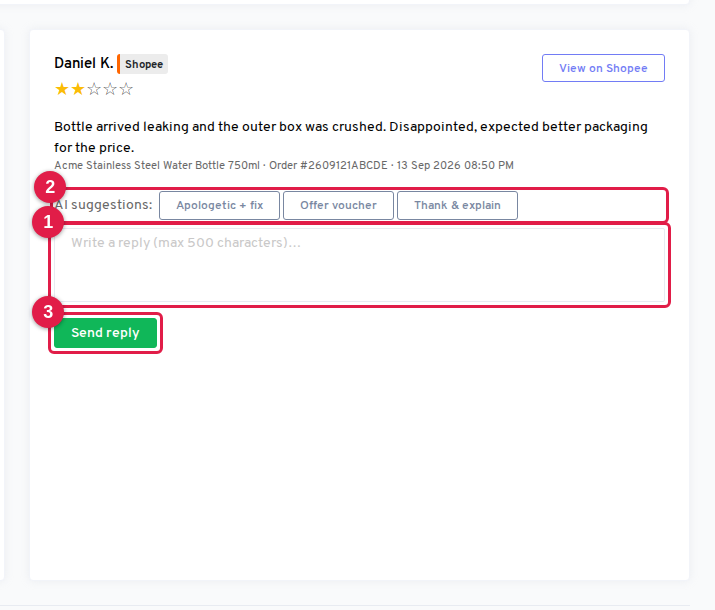
Click a review in the list to open it on the right. You will see the buyer’s name (or “Anonymous buyer”), the star rating, the review text, the product it was left on, the order number, and when it was posted. View on Shopee or View on Lazada opens the listing on the marketplace in a new tab.
To reply:
- Type your reply in the box (1), or click one of the AI suggestions (2) to have OneCart draft one for you. There are three tones:
- Apologetic + fix apologises and offers to put things right. Use it for complaints.
- Offer voucher apologises briefly and offers a voucher on the next order.
- Thank & explain thanks the buyer and adds a short explanation. Use it for positive reviews or minor issues.
- Edit the draft as much as you like. Replies are limited to 500 characters, which is the Lazada limit and is enforced for every platform.
- Click Send reply (3).
OneCart posts the reply to the marketplace first and only records it in the inbox once the marketplace has accepted it. If the marketplace rejects the reply, you will see an error message and the review stays in Needs reply, so nothing is marked as done that the buyer cannot see.
Once sent, a reply cannot be edited or deleted, because Shopee and Lazada do not allow sellers to change a posted reply. Read the draft carefully before sending.
When a review cannot be replied to
Some reviews show a notice instead of the reply box:
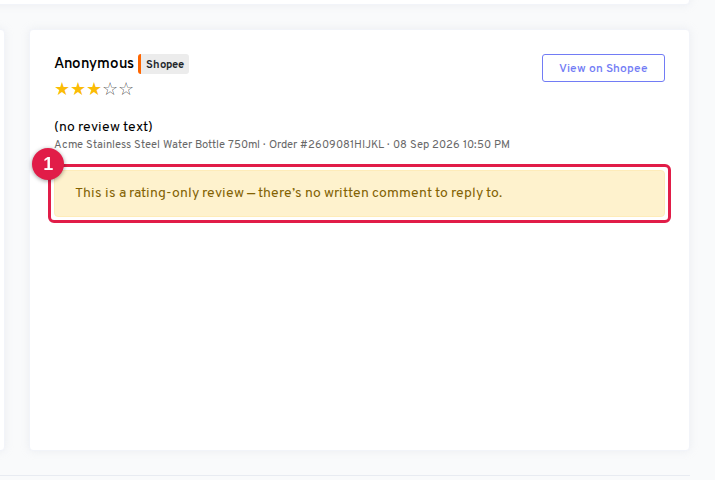
- “This is a rating-only review”: the buyer left stars but no text, so the marketplace does not accept a reply.
- “This review can’t be replied to from OneCart right now”: the marketplace reported that a reply is not allowed for this specific review, usually because it already has one posted directly in Seller Center. Use Open in Seller Center to check it there.
How reviews get into OneCart
- Reviews sync automatically from every active Shopee and Lazada shop. New reviews appear within about an hour.
- When a shop is first connected, OneCart also imports its recent review history so the inbox is not empty on day one. Older reviews stay marked as unanswered until you reply.
- Each review is linked to the OneCart listing it was left on, so the product title shows in the list. If a listing has not been imported yet, the review still appears without a product title.
- Reviews from other platforms are not synced yet.
Tips for keeping the queue short
- Start every session on Needs reply with Critical ≤2★ in mind: unhappy buyers are the ones most likely to escalate, and a fast public reply shows other shoppers that you take care of problems.
- Use Thank & explain on 4-star and 5-star reviews. A short thank-you costs nothing and lifts your reply rate, which marketplaces reward with better visibility.
- Filter by Shop when different people handle different stores. Each person can work their own queue without seeing the rest.
- Watch Median reply time. If it is creeping up, the queue is growing faster than you are answering it.
Related articles

