Processing Daily Orders By Marketplace or by Brand
Learn how to process daily orders in OneCart by marketplace (Shopee, Lazada, Qoo10) or by brand, with step-by-step instructions for both methods.
Learn how to process daily orders in OneCart by marketplace (Shopee, Lazada, Qoo10) or by brand, with step-by-step instructions for both methods.
In OneCart, there are several ways to process daily orders, depending on your existing workflows.
If you are managing several brands on each marketplace, you may wish to:
Process your orders Marketplace by Marketplace
Process your orders Brand by Brand
In this article, we explain how to process orders in both cases.
Method 1 : Processing orders by marketplace
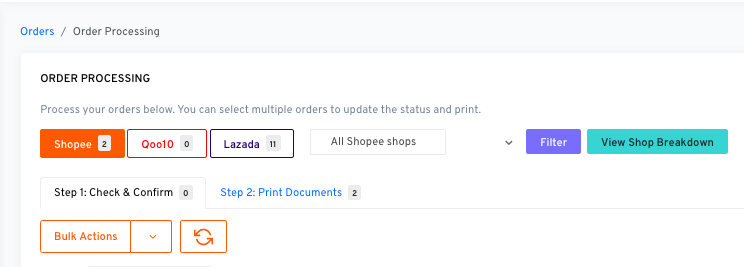
By default, OneCart shows you orders marketplace by marketplace
Navigate to Process Orders > Arrange Shipping
Select the marketplace you wish to process by clicking on the desired tab (Shopee, Lazada, or Qoo10)
Method 2: Processing orders Brand by Brand
If you wish to process each brand separately, you can:
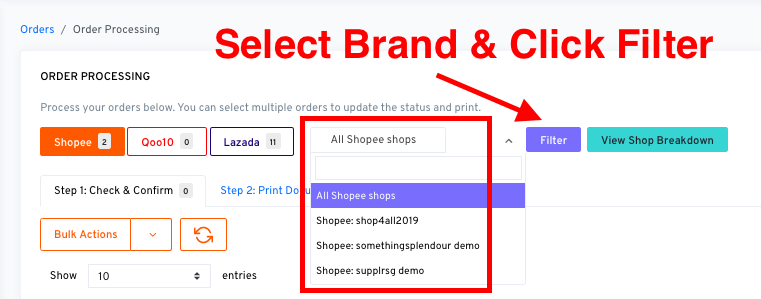
click on All Shops > select brand
click on Filter
OneCart will pull up orders from the specific Brand selected
In both methods, you can fulfill orders by:
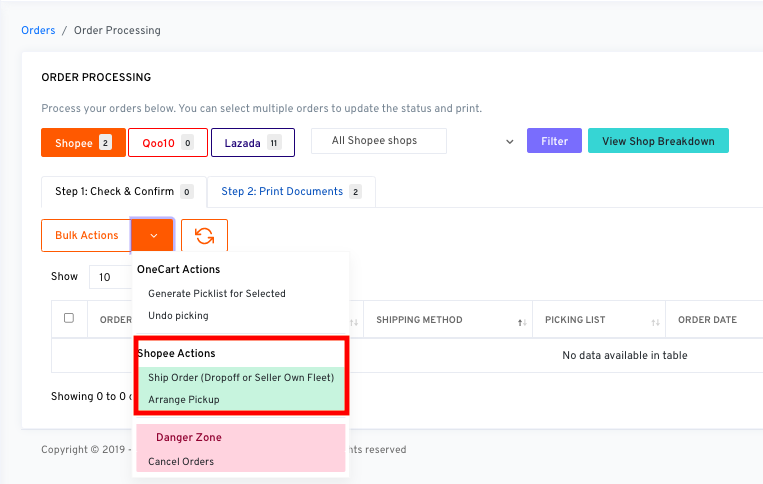
bulk-selecting all desired orders under Step 1: Check & Confirm
Click on Bulk Actions > Arrange Pickup (for Shopee) or ‘Set as Ready To Ship’ (for Lazada) or ‘Arrange Pickup/Dropoff’ (for Qoo10)