How to export Product List from Shopify?
If you need to bulk update your SKUs into Shopify, here's how you can export your product list.
If you need to bulk update your SKUs into Shopify, here's how you can export your product list.
Log in to your Seller Centre Account
On the left-hand side menu,
Home > Products > All Products
Click on “Export” on the top right side

A small window will prompt you to input your selection.
Ensure to select “All Products” and “CSV for Excel, Numbers, or other spreadsheet programs”.
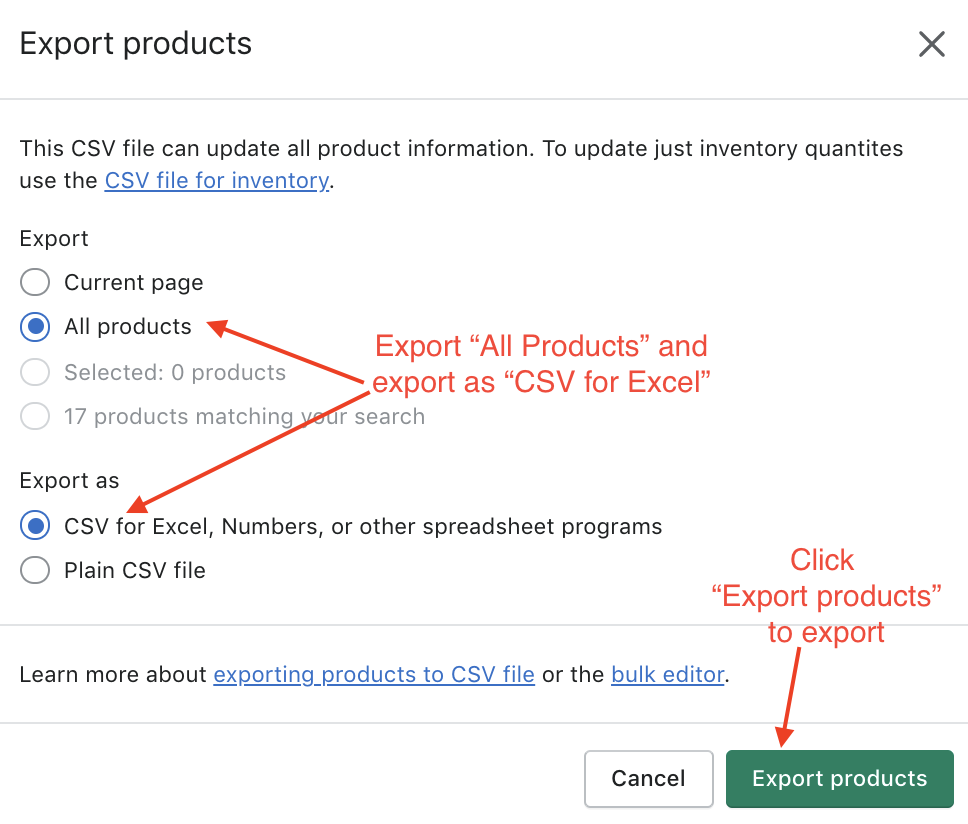
Once you click on “Export Products”, it will download and save to your computer.
**Note: Need help generating SKUs? You can use our Free AI SKU Generator here: https://www.getonecart.com/tools/free-ai-sku-generator/