Finding Top and Worst Selling SKUs in OneCart
Learn how to identify your top-performing and lowest-performing SKUs in OneCart. This guide will walk you through analyzing SKU performance data and leveraging insights to optimize your inventory strategy.
Help Article
Last updated Nov 11, 2024
1 min read
OneCart constantly collects and tracks sales trends with each incoming order.
With our Sell Through module, you can quickly find your top selling SKUs, and worst selling SKUs, for any designated time period to help you craft your next growth strategy.
This is especially convenient for the following use cases:
Repurchasing winning SKUs and removing losing SKUs from your SKU inventory.
Bundling slow-moving SKUs with fast-moving SKUs to make room for new SKUs in your warehouse.
Prioritising growth strategies around top selling SKUs.
To locate your winning and losing SKUs, navigate to:
The Sell Through page is also accessible via this quick link: https://app.getonecart.com/reports/skus
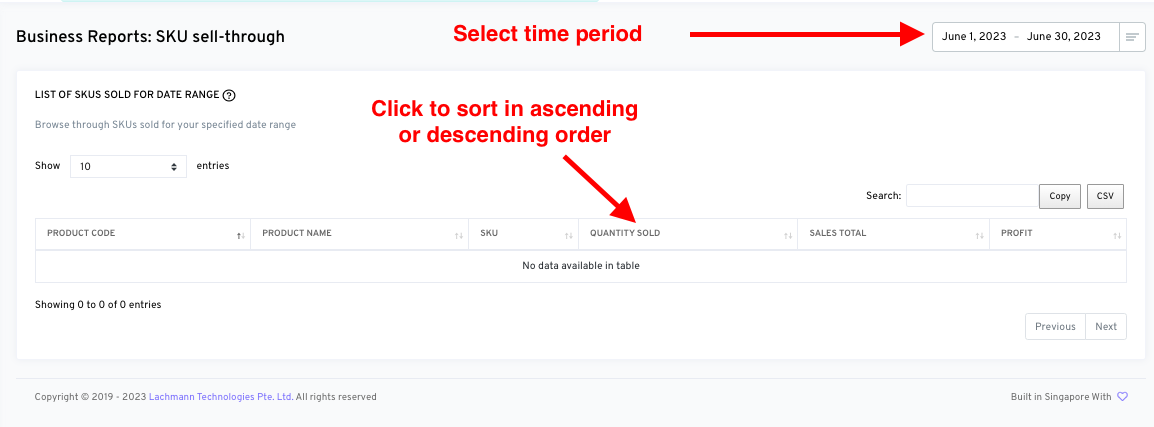
To sort the results by Quantity Sold, click on the column name ‘Quantity Sold’.
To view your top selling SKUs, you can sort the Quantity Sold column from highest to lowest numbers (and vice versa, to find your slow moving items).
You can select any time period to view your Sell Through results.
The displayed results are your omni-channel SKU sell-through.