Downloading Daily Order Picklists
Download daily order picklists in OneCart using three formats: SKU picklist, image picklist, or Excel export. Available for consolidated or selected orders.
Download daily order picklists in OneCart using three formats: SKU picklist, image picklist, or Excel export. Available for consolidated or selected orders.
In OneCart, you can download your daily pick lists in various formats depending on your existing workflows:
Format 1: SKU pick list : consolidated, or for selected orders
Format 2: Image pick list : consolidated, or for selected orders
Format 3: Order pick list in Excel format, consolidated or for selected orders
Format 1 : SKU pick list
A ) Consolidated SKU pick list for all orders across all marketplaces and all brands
Navigate to Process Orders > Arrange Shipping
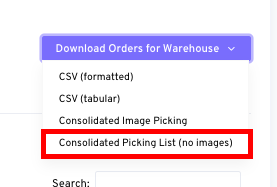
Click on ‘Download Orders for Warehouse’ > ‘Consolidated Picking List (no images)’
B ) SKU pick list for selected orders only
Navigate to Process Orders > Arrange Shipping
Select the specific orders by checking the associated tickbox
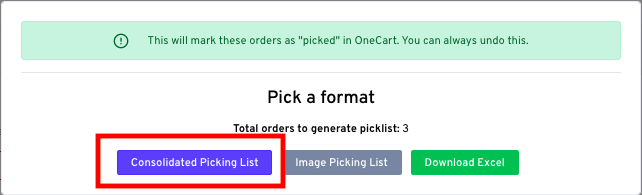
Click on ‘Bulk Action’ > ‘Generate Picklist for Selected’ > ‘Consolidated Picking List’

Format 2 : Image pick list
A ) Consolidated pick list for all orders across all marketplaces and all brands
Navigate to Process Orders > Arrange Shipping
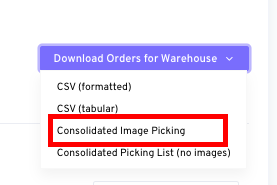
Click on ‘Download Orders for Warehouse’ > ‘Consolidated Image Picking’
B ) Image pick list for selected orders only
Navigate to Process Orders > Arrange Shipping
Select the specific orders by checking the associated tickbox
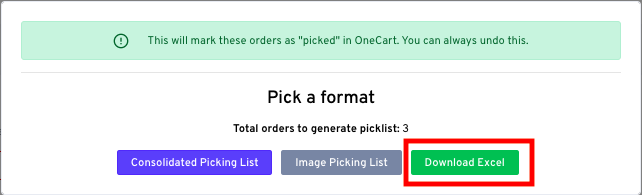
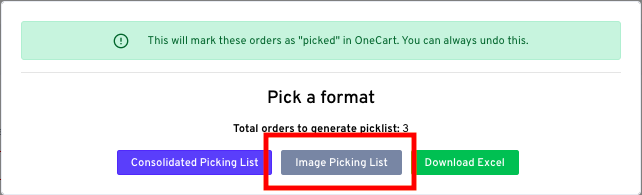
Click on ‘Bulk Action’ > ‘Generate Picklist for Selected’ > ‘Image Picking List’
Format 3: Order pick list in Excel file
A ) Consolidated pick list for all orders across all marketplaces and all brands
Navigate to Process Orders > Arrange Shipping
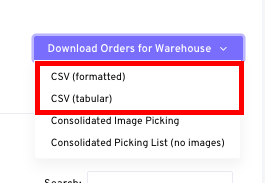
Click on ‘Download Orders for Warehouse’ > ‘CSV (formatted)’ or ‘CSV (tabular)’
B ) Order pick list for selected orders only
Navigate to Process Orders > Arrange Shipping
Select the specific orders by checking the associated tickbox
Click on ‘Bulk Action’ > ‘Generate Picklist for Selected’ > ‘Download Excel’