Connecting NTUC FairPrice to OneCart
To integrate your NTUC FairPrice account with OneCart, you can now add your shop directly through the OneCart platform. Follow the steps below to complete the integration.
To integrate your NTUC FairPrice account with OneCart, you can now add your shop directly through the OneCart platform. Follow the steps below to complete the integration.
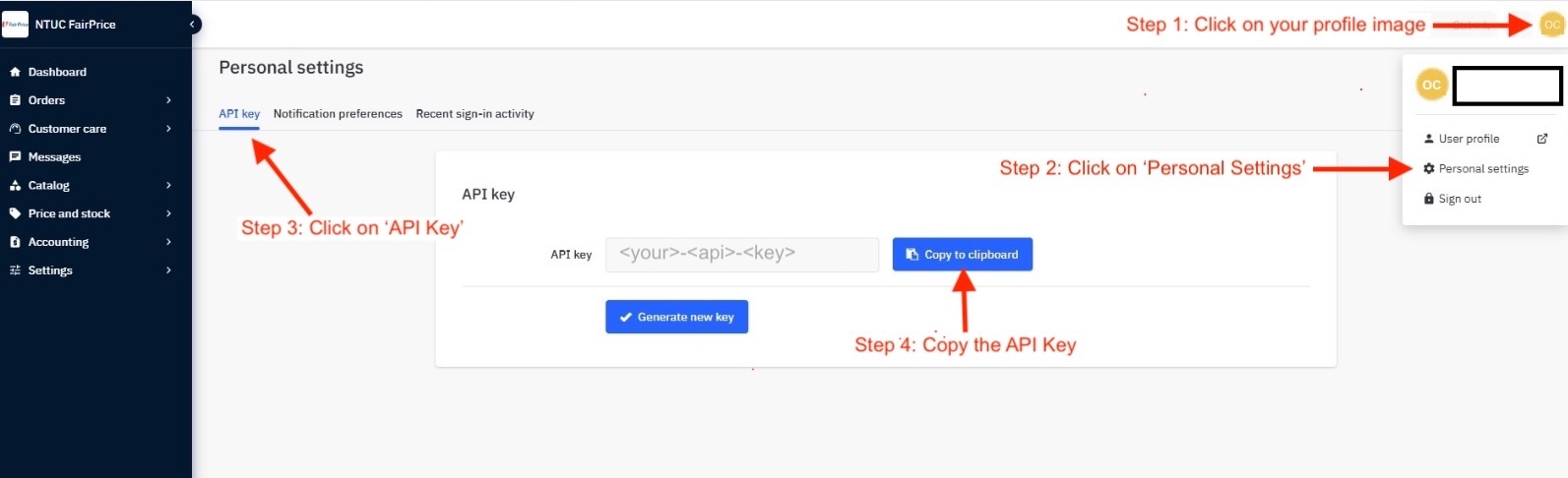 **
**
Go to Settings > My Platforms > Manage Connections
Click on the ‘Add New’ button
Then Pick a Platform To Add - choose ‘Add Shop for NTUC’
Fill in the required fields:
Click “Save” to complete the integration
Important Notes
Following these steps will ensure a smooth integration process between NTUC FairPrice and OneCart. 🚀