Auto Review Reply for Shopee & Lazada
Let OneCart draft on-brand replies to your Shopee and Lazada reviews. Positive reviews send automatically after a short hold window, while complaints are always held for you to approve. Configure it from Automations, Marketing tab.
Help Article
Last updated Sep 16, 2026
7 min read
Auto Review Reply lets OneCart handle the routine work of replying to your marketplace reviews, while keeping you in control of anything sensitive. When a new review arrives on a connected Shopee or Lazada shop, OneCart drafts an on-brand reply for you. Clearly positive reviews send on their own after a short hold window. Anything that reads as a complaint is always held for a human to approve first.
You configure it from Automations, Marketing tab.
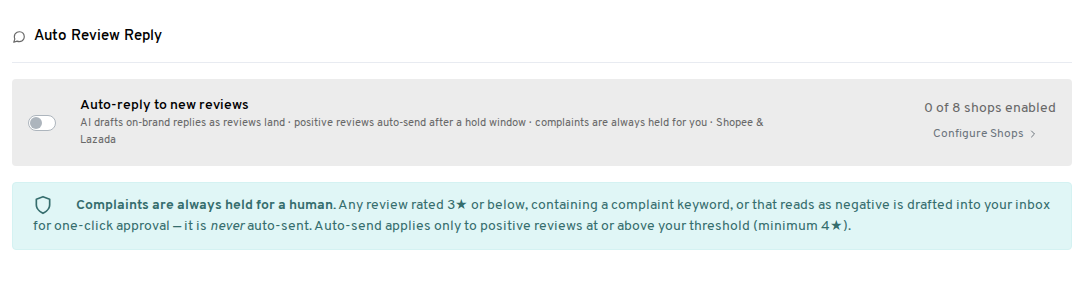
What it does
OneCart watches your connected Shopee and Lazada shops for new reviews and sorts each one into one of three outcomes.
- Positive reviews at or above your chosen star rating get an AI-drafted thank-you. The draft waits for your hold window, then sends automatically.
- Complaints are always drafted apologetically and held in your Reviews inbox for you to approve. They are never sent automatically. A review counts as a complaint if it is rated 3 stars or below, contains a complaint word (such as refund, damaged, or late), or simply reads as negative.
- Rating-only reviews (a star rating with no written comment) are never replied to. There is nothing to respond to, and marketplaces do not reliably accept replies to them.
The result is that easy wins (“Great product, fast delivery!”) are handled for you, while every review that needs a careful human touch lands in your inbox with a draft already prepared. Replies are kept concise, up to 500 characters.
How the drafts are written
Review replies are public, and most of the people who read them are future buyers deciding whether to order from you. The AI writes every draft with those readers in mind.
- Positive reviews get a short, warm thank-you of about 10 to 20 words. There’s no sales pitch and no long explanation.
- Negative and mixed reviews get a polite reply that takes responsibility on behalf of your shop and invites the buyer to message you in the platform chat so you can fix the problem. The draft never argues with the buyer and never blames the buyer, the courier or the platform. A calm reply that owns the issue reassures future buyers more than a defensive one.
How to turn it on
- Go to Automations and open the Marketing tab.
- Find the Auto Review Reply card.
- Use the master toggle on the card to switch Auto Review Reply on across all your eligible shops at once. To turn it on for specific shops, or to change a shop’s settings, click Configure Shops.
The master toggle is the quickest way to turn the feature on or off everywhere. Configure Shops gives you finer control, for example turning it on for one Shopee shop while leaving another off.
Settings, and what to set them to
Each shop has its own configuration. Click Configure Shops on the card, then open a shop to see these settings.
Auto-send threshold. Choose which positive reviews are allowed to send automatically: 4 stars and above, or 5 stars only. Choose 5 stars only if you want to reply automatically to your happiest customers and personally handle everything else. This threshold can never be lowered below 4 stars, so a genuine complaint can never slip into the auto-send path.
Hold window (minutes). The delay between a positive draft being prepared and it actually sending. Default is 20 minutes. This window gives you time to notice the review and step in if you want to reply yourself or tweak the message. If you reply manually during the hold window, your reply wins and the automatic one is cancelled.
Daily auto-send cap. The maximum number of automatic replies a shop will send per day. Default is 200. Leave it blank or set it to 0 for no cap. This is a safety limit so a sudden surge of reviews cannot produce an unexpected flood of replies. Complaints held for you do not count toward this cap.
Brand voice. A short tone guideline passed to the AI so replies sound like your store. Keep it to a sentence or two. For example:
Warm and friendly, sign off as "The Acme Retail Team", a light emoji is fine, reply in English.Professional and concise, thank the customer by name where possible, no emojis, always mention we ship within 24 hours.
What happens to a held complaint
When a review is held for you, OneCart does two things:
- Creates an in-app notification titled “Review needs your reply”.
- Sends an email with the same subject to the users on your account who have that notification turned on. The email shows the review, the star rating, and the suggested reply.
Both the notification and the email link straight to the review in your Reviews inbox. There, the AI’s draft is already filled into the reply box, with a note explaining it was held for you.
Read the draft, edit anything you want to change, then click Send reply. You are always the one who approves a complaint reply before it goes out.
Turning off the complaint email
If you prefer to work from the in-app inbox and do not want the email, you can switch it off:
- Go to Notification Preferences.
- Under the Reviews category, turn off “Review needs your reply”.
You will still see held complaints in your Reviews inbox and the in-app notification, just without the email.
The kill switch
Turning the master toggle off stops everything immediately. Nothing new is drafted, and any positive draft still waiting in its hold window will not send. OneCart re-checks the toggle at the moment of sending, so switching off is an instant, reliable stop.
What Auto Review Reply never does
These rules are built into the feature so you can enable it with confidence.
- It never auto-sends a reply to a complaint. Complaints always wait for you.
- It never promises a refund, discount, or voucher in an automatic reply.
- It never posts a phone number or email address in a reply.
- It never replies to a review more than 7 days old, so switching the feature on will not reply to your back catalogue of old reviews.
- It never replies to a review you or the marketplace have already answered.
If an AI draft ever trips one of these rules (for example the wording drifts toward promising a refund), OneCart holds it for you instead of sending it.
Auto Review Reply works with Shopee and Lazada, the platforms where OneCart can both read reviews and post replies. Reviews from other platforms are not part of this automation.
FAQ
Can I change a reply after it has been sent?
No. Once a reply is posted to Shopee or Lazada, it cannot be edited, because the marketplaces do not allow sellers to edit a review reply after posting. This is exactly why the hold window and the always-held complaints exist, so you get your say before anything goes out.
What if I reply to a review myself during the hold window?
Your reply wins. As soon as you send your own reply, the pending automatic reply is cancelled and will not send.
Will it reply to my old reviews when I turn it on?
No. Only reviews from the last 7 days are ever handled automatically. Older reviews stay in your inbox for you to answer manually if you wish.
Does a 5-star review always send automatically?
Only if it is not flagged as a complaint. A 5-star rating with text that mentions a problem (for example “5 stars but arrived late”) is treated as a complaint and held for you, never auto-sent.
Does it cost extra AI credits?
No. Auto Review Reply is included at no extra cost.

