Create an Ecommerce Website Singapore Consumers Love [2025]
Discover expert tips to plan build and scale your ecommerce website singapore for maximum sales with SEO payments shipping and marketplace expansion
Discover expert tips to plan build and scale your ecommerce website singapore for maximum sales with SEO payments shipping and marketplace expansion

Launching an ecommerce site in Singapore means nailing two things: lightning-fast mobile pages and payment methods locals trust. With over 80% of Singaporeans tapping away on their smartphones, every millisecond counts—from the moment they land on your homepage to that final “Pay Now” click.
A few essentials can elevate your site from “just another store” to a local favourite:
Integrating local PSPs right into your checkout flow isn’t just nice to have—customers expect it. When you embed PayNow’s QR scan or let customers pay with their GrabPay balance in a single tap, you remove friction and build trust.
One gadget reseller in Orchard Road saw a 40% increase in mobile conversions after rolling out GrabPay. That’s the power of aligning with local habits.
And don’t overlook context. Mention free delivery thresholds in SGD, sprinkle in Singlish idioms where appropriate, and time your flash sales around 9.9, 11.11 or Chinese New Year.
These subtle tweaks speak directly to Singaporean buyers and nudge fence-sitters toward checkout.
Love, Bonito’s team once trimmed their mobile checkout from six steps down to three. The result? A 25% drop in cart abandonment.
For merchants, this means tapping into an online community where smartphone penetration tops 80%, supported by rock-solid logistics and payment rails—locally and across borders. Learn more about this market expansion findings.
These quick checks highlight performance bottlenecks and usability snags before your big launch.
Actionable insight: Schedule these audits weekly and log your load times in a shared spreadsheet so your team can track improvements.
For example, a local tea shop introduced an eco-pack option during Deepavali flash sales and saw orders rise by 15%.
Prioritise features that resonate with Singaporean habits to boost conversions.
With these audits and niche insights in hand, sketch out a clear action plan for growth:
By tracking these metrics, you’ll focus on improvements that translate into real sales and stronger customer loyalty in Singapore’s competitive ecommerce arena.
Start today and you’ll notice uplift in just a few weeks—measurable results that keep momentum rolling.
The platform you pick influences everything—from your launch timeline to ongoing costs. Over the years, I’ve seen brands thrive on Shopify, WooCommerce or local builders like Shopmatic and XPress. To cut through the noise, keep these evaluation points front of mind:
Spin up sandbox stores and test in real time. You’ll uncover UI quirks and missing features long before your customers do. For example, a fashion label might insist on drag-and-drop theme editing, while a gadget reseller needs robust API hooks for inventory sync.
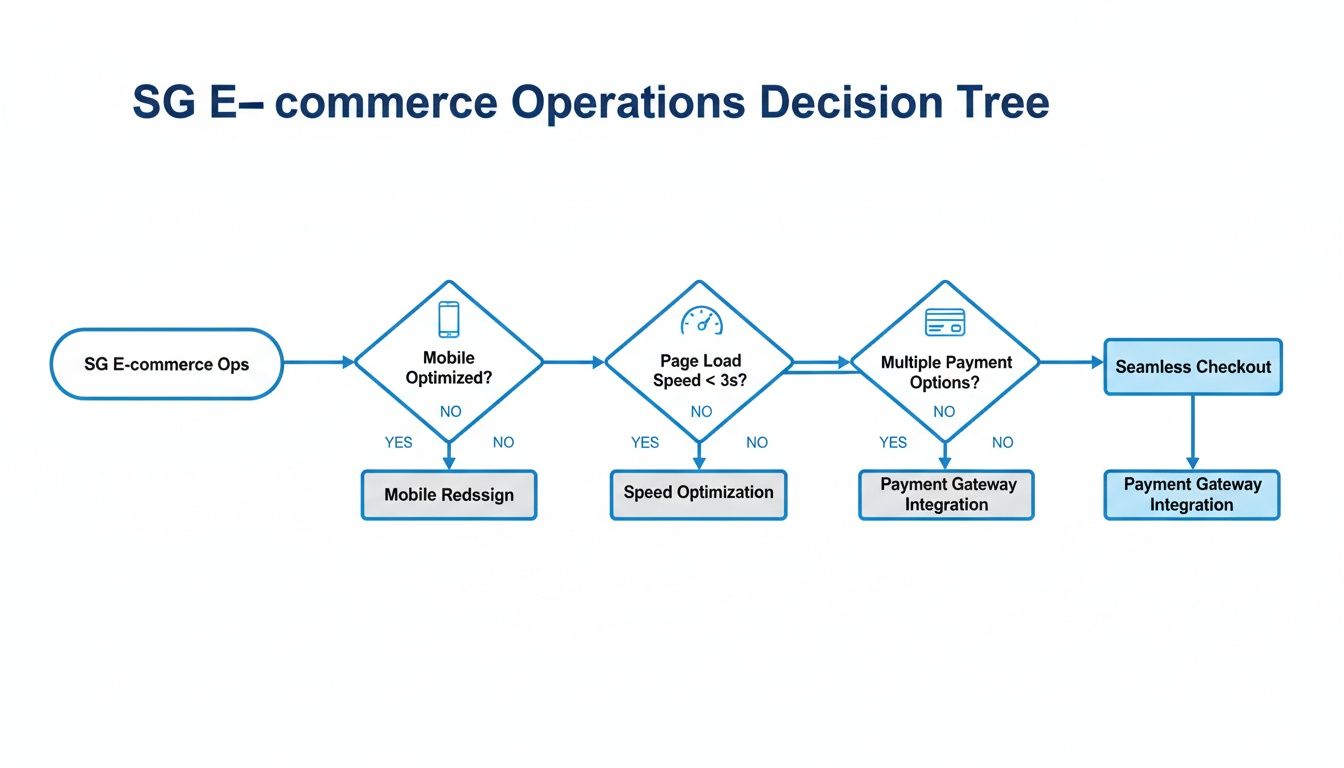
This decision-tree graphic breaks down three critical checks—mobile readiness, page speed and payment setup—and shows why tackling speed bottlenecks first pays dividends.
Accurate projections help you avoid budget shocks. Here’s a ballpark for a small online store:
A local brand I worked with budgeted SGD 85 per month on hosting and WooCommerce. They also set aside extra for traffic surges on 11.11 and 12.12.
Negotiate setup fees with agencies by bundling theme tweaks and SEO into a single package.
Clear scopes help agencies offer flat-fee quotes and speed up delivery.
| Platform | Setup Cost | Customisation Level | Local Support | Scalability |
|---|---|---|---|---|
| Shopify | SGD 29–299/month | Medium | Strong | High |
| WooCommerce | SGD 5–50/month | High | Medium | Medium |
| Shopmatic | SGD 19–150/month | Low | Strong | Low |
| XPress | SGD 25–200/month | Medium | Medium | Medium |
This table highlights how each option stacks up on cost, customisation, support and growth potential. Use it as a starting point—then dive deeper into platform-specific demos.
Full-site setups often land between SGD 1,000–5,000. You can trim that by:
You might be interested in our official ecommerce platforms guide at OneCart. Always test an agency’s response times and familiarity with regional payment methods before signing on.
Lessons from peers can spark your own success:
These wins come from matching a platform’s strengths to your product mix.
Holiday campaigns demand extra prep:
Local founder tip: Use a staging site to dry-run flash sales on each platform.
Before you go live, run through this list:
Make sure your technical team can hit API rate limits without surprises. Shopify offers both REST and GraphQL endpoints with healthy quotas. WooCommerce gives you full server control via self-hosting. Local builders may cap their API calls—so verify those limits if you plan deep integrations.
Picking the right domain name is more than branding—it’s the foundation for a speedy ecommerce website Singapore shoppers will love.
Pair a registrar like GoDaddy or Namecheap with a local host such as Exabytes or Vodien. This combination can keep page loads under 2 seconds and strengthen your local SEO signals.
Once domain and hosting are settled, focus on payment methods your customers trust. Integrating multiple gateways reduces cart abandonment and offers flexibility.
Here’s a quick look at popular Singaporean PSPs:
| PSP | Transaction Fee | Settlement Time | Integration Effort |
|---|---|---|---|
| Stripe | 3.4% + S$0.30 | 2 business days | Medium |
| PayNow | 0% | Instant | Low |
| GrabPay | 2.8% + S$0.20 | Same day | Low |
Whether you prioritise cost or speed, this table should guide your choice.
Automating your GST and compliance tasks saves an average of 5 hours per month, so you can focus on marketing.
Singapore’s GST sits at 8% for local sales. Install a plugin—on platforms like Shopify or WooCommerce—to auto-apply rates at checkout.
For Peppol-compliant e-invoicing, most accounting apps integrate out of the box. Push your invoices directly to IRAS, keep audit trails tidy, and you’ll dodge last-minute scrambles.
A monthly export routine transforms GST audits from panic mode to clockwork precision. Use OneCart’s API or built-in tools to schedule tax dumps.
Connect these exports to your accounting software and have a lightweight script email reports to your finance team. Over time, you’ll cut review time by about 20% each quarter.
Before going live, tick off these essentials to lock in reliability:
A thorough checklist like this slashes refund rates tied to downtime or invoice hiccups, and builds customer confidence from day one.
Singapore’s mobile-first shoppers drive over 80% of online sessions and orders. Offering seamless PayNow and GrabPay options is no longer optional. Discover more mobile commerce insights on Accio.
Configuring multi-currency settings is vital for cross-border sales—no one wants a surprise at checkout. And don’t forget: regular DNS backups and hosting snapshots are your safety net against accidental deletions.
Get started with OneCart to simplify setup, sync tax data automatically, and keep your finance teams aligned.

Getting orders out the door smoothly is non-negotiable. A tight fulfilment process keeps customers happy and coming back for more.
Working with the right couriers can cut delivery times without spiking your costs.
In Singapore, these three carriers lead the pack:
| Courier | Domestic Rate | Cross-Border Rate | Pickup Fee |
|---|---|---|---|
| SingPost | SGD 1.50 | N/A | SGD 0 |
| Ninja Van | SGD 2.00 | SGD 5.00 | SGD 1.00 |
| Qxpress | SGD 1.80 | SGD 4.50 | SGD 1.20 |
For example, a skincare brand tested Ninja Van for small parcels, saving 10% on shipping costs while maintaining delivery speed.
Run your average parcel dimensions against each courier’s tiered pricing before you commit. A 12×12×12 cm mailer will attract different fees than a 30×30×30 cm carton.
Well-packaged goods travel without drama. Fewer breakages mean fewer refunds and happier customers.
| Package Type | Internal Dimensions |
|---|---|
| Small Box | 20×15×10 cm |
| Medium Box | 30×25×15 cm |
| Large Box | 50×40×30 cm |
Each courier API speaks its own language. A small middleware layer can translate status codes, rate queries and label requests into one universal format.
Showing live tracking updates on your store builds trust and cuts down on support tickets dramatically.
Trigger your own call, for example: fetch('/track?awb=12345'), then push those updates to your order page.
Key takeaway Real-time updates can cut support inquiries by up to 25%.
Juggling Shopee, Lazada and TikTok Shop listings by hand is a recipe for oversells. OneCart brings everything under one roof.
Shopee alone manages around US$3.45 billion in local revenue, and Lazada plus TikTok Shop are hot on its heels. For the full breakdown, explore the ECDB Singapore Marketplace Revenue Dashboard.
“A local beauty brand we work with slashed fulfilment errors by 40% by consolidating orders in OneCart.” – Operations Lead
Nothing erodes trust like an out-of-stock order. Automate daily inventory reconciliation in OneCart and flag mismatches before they become customer nightmares.
Check out our guide on last-mile delivery services from OneCart to optimise final-mile performance. Start syncing today for truly seamless operations.

Even seasoned ecommerce business owners in Singapore feel the tension as launch day approaches. A tiny glitch now can ripple into lost revenue or a swarm of frustrated customers. That’s why a focused checklist—and crystal-clear roles—are your best defence.
We’ll highlight the sneaky traps that often slip under the radar and share how local founders turned near-disasters into wins.
Put yourself in your customer’s shoes and click through every page. Slow loads, layout shifts or unclear labels are red flags. In one boutique’s launch, a misaligned “PayNow” button almost broke checkout—but their quick-fix workflow caught it in minutes.
• Test a full purchase with credit card or PayNow
• Verify page titles, meta descriptions and alt tags meet SEO best practices
• Run responsiveness checks on multiple phone and tablet sizes
| Trap Type | Impact | Quick Fix |
|---|---|---|
| Broken Links | Drops in SEO and customer trust | Bulk-scan URLs and auto-patch broken links |
| Misconfigured Shipping Rules | Overcharges or lost orders | Adjust in staging before syncing live |
| Missing Support Workflow | Slow response times | Deploy prebuilt templates with escalation steps |
Use this quick-reference table during your final audit. And remember: versioned backups plus clear fallback triggers are your insurance policy against failed experiments.
A solid rollback plan means you’re never caught flat-footed. Start by pinpointing which site components need version control. Define clear pass/fail metrics before go-live and schedule automated backups during peak hours. Finally, assign team members to trigger a rollback if things head south.
Next up: communication templates. Predefine tone, messaging and next steps so no one’s stuck crafting a reply under pressure.
When an issue strikes, speed matters. Keep your canned responses tight and action-focused:
• Payment failures: apologise, outline retry steps and share alternative links
• Delayed order confirmations: provide status updates with expected resolution times
• Site performance alerts: activate a lightweight fallback page and notify your devs
“A solid rollback process and clear communication saved our store during a big sale glitch.” – Local founder testimonial
Before launch, stress-test your mobile design and simulate peak traffic. Passing these trials means you’ll roll out with confidence.
Don’t let valuable data slip through the cracks. Schedule a debrief within 48 hours of going live. Collect conversion rates, bounce percentages and error-log highlights in a shared dashboard for instant trend spotting.
OneCart analytics brings order volume and channel performance into a single pane. Linking Shopee, Lazada and TikTok Shop stats cuts down manual reporting and surfaces surprises fast:
• Identify unexpected cart abandonment spikes
• Review payment provider logs for error codes
• Confirm new tags and meta updates are firing correctly
Actionable step: Summarise key findings and assign owners for fixes within 48 hours of launch.
Pull these learnings—both triumphs and stumbles—into your central wiki or project board. That way, every launch becomes a stepping stone toward smoother rollouts and happier customers.
Sustaining momentum on your ecommerce site in Singapore calls for a blend of SEO, paid ads and marketplaces. A few tweaks to metadata and page speed not only lift your organic rankings but also make every ad dollar stretch further.
Kicking off with Google Ads means thinking like your customer. Picture them typing “buy electronics online SG” or “affordable skincare Singapore”. Group these high-intent terms into themed ad groups, then set daily spends based on past click costs and seasonal peaks.
Once your search ads are humming, chase visitors who didn’t convert. Facebook retargeting reconnects with those window-shoppers, while Lookalike Audiences expand your reach to similar prospects.
Shopee and Lazada draw millions daily—your ads should be right where the action is. Investing across both platforms maximises your visibility in the SG market.
Learn more about marketplace ad formats in our detailed guide on Shopee vs Lazada ad formats.
Data drives decisions. In OneCart analytics you’ll find your top-selling SKUs and those slow movers dragging cashflow. Use these insights to design dynamic pricing experiments and targeted promos.
A local gadget shop put this into practice—by tweaking bids and keywords hourly, they doubled ROI within a week.
“Real-time data allowed us to pivot ad spend and double returns in one week,” says their Operations Manager.
Ads fuel quick wins, but SEO builds a traffic foundation that lasts. I carve out time every month to update meta titles and descriptions with fresh local phrases, like “next-day delivery in Singapore”.
Internal linking also deserves attention—guide readers from blog posts about new arrivals straight to the product pages. After compressing images and enabling lazy loading, I’ve seen a 0.5-second drop in Largest Contentful Paint lift organic clicks by 10%.
Mixing paid and organic channels this way keeps growth sustainable. It’s the formula that cements your ecommerce site as the one Singapore shoppers trust.
Actionable insight: Block one hour each month for an SEO and ads review meeting to adjust keywords and budgets based on performance data.
Picking the right storefront starts with your inventory and your growth roadmap. A catalogue of 50+ items? Shopify’s 2,000+ apps give you room to roll out promotions on the fly. If you crave full control on your own server, WooCommerce remains a solid choice. For boutique ranges, Shopmatic gets you live in under an hour.
Sign up for free trials, list your top three requirements—payment gateways, shipping integrations, SEO tools—and see how each platform handles them in practice.
Set GST at 8% for all local orders and plug into a Peppol-compliant invoicing flow. Tools like Xero or QuickBooks automate your monthly exports, saving you precious time.
Automating GST routines can free up 5 hours every month and cut down on errors.
Domestic deliveries are all about that sweet spot between cost and transit time. Here’s what we see most often:
Pull a weekly volume report, then negotiate a 10% rebate once you’re shipping 500+ parcels.
| Courier | Rate | Delivery Time |
|---|---|---|
| SingPost | SGD 1.50 | Next-day |
| Ninja Van | SGD 2.00 | 1–2 days |
| Qxpress | SGD 1.80 | 3–5 days |
Revenue is just the starting line. Keep an eye on these four KPIs:
Feed these figures into OneCart dashboards for a unified snapshot across Shopee, Lazada and your own site. Set monthly targets so you can catch—and fix—any dips early.
Ready to speed up your operations? Discover OneCart.
Automate & Scale Your Online Business with OneCart
Start a Free TrialUsed by hundreds of merchants in Singapore & Southeast Asia