A Guide to Ecommerce Order Management Software 2026
Discover how ecommerce order management software streamlines operations, syncs inventory, and automates fulfillment to help you scale your online store.
Discover how ecommerce order management software streamlines operations, syncs inventory, and automates fulfillment to help you scale your online store.
Ecommerce order management software is the digital command center for your online sales operation. It pulls all your orders, inventory data, and shipping tasks from every place you sell—like Shopify, Amazon, and TikTok Shop—into one unified dashboard. The goal is to stop the chaos that comes from juggling multiple platforms by hand.
Think of a busy restaurant kitchen on a Saturday night. Orders fly in from waitstaff, online delivery apps, and over the phone. Instead of chaos, every order gets printed on a ticket and lined up in one place. The head chef sees everything on a single rail, knows exactly what to cook next, and can tell at a glance which ingredients are running low.
That is what ecommerce order management software does for your online store. It is that central ticket rail, consolidating every order into one system.
This single view means no more logging in and out of different seller portals all day. It gets rid of messy spreadsheets and stops the human errors that always creep in when you’re copying and pasting customer data. It transforms a scattered, reactive process into a controlled, proactive workflow.
Imagine your business is really starting to take off. You started out handling 50 orders a day, which was manageable with a few spreadsheets and direct logins. Now, you’re hitting 500 orders a day.
At this scale, manual processes break.
This is the exact moment an ecommerce order management software becomes essential. It automates these mind-numbing, repetitive tasks and gives you a single source of truth for your entire operation. This frees up your team to focus on fulfilling orders accurately and quickly, not just juggling admin work. You might be interested in how this centralized approach is a key part of an effective omni-channel retail strategy.
Actionable Insight: A centralized system ensures that when an order is placed on any channel, inventory is updated everywhere else in real-time. This simple function is the key to preventing overselling and maintaining customer trust.
Ecommerce order management software is a central hub. It often acts as a key piece of a broader multi-channel selling software stack. The market for these tools is growing fast, and for good reason.
The global ecommerce order management software market was valued at USD 3.65 billion in 2024 and is projected to hit USD 13.81 billion by 2033. This growth reflects how critical it has become for businesses to automate their operations to scale efficiently. You can discover more about these market trends and their drivers in the full report.
Knowing what an ecommerce order management software does on paper is one thing, but seeing how its core features solve real-world problems is another. These are purpose-built tools designed to cut out manual work, reduce errors, and get your business ready to scale.
The process is designed to be simple and effective. It takes orders from all your scattered sales channels and funnels them into one central hub for automated processing.
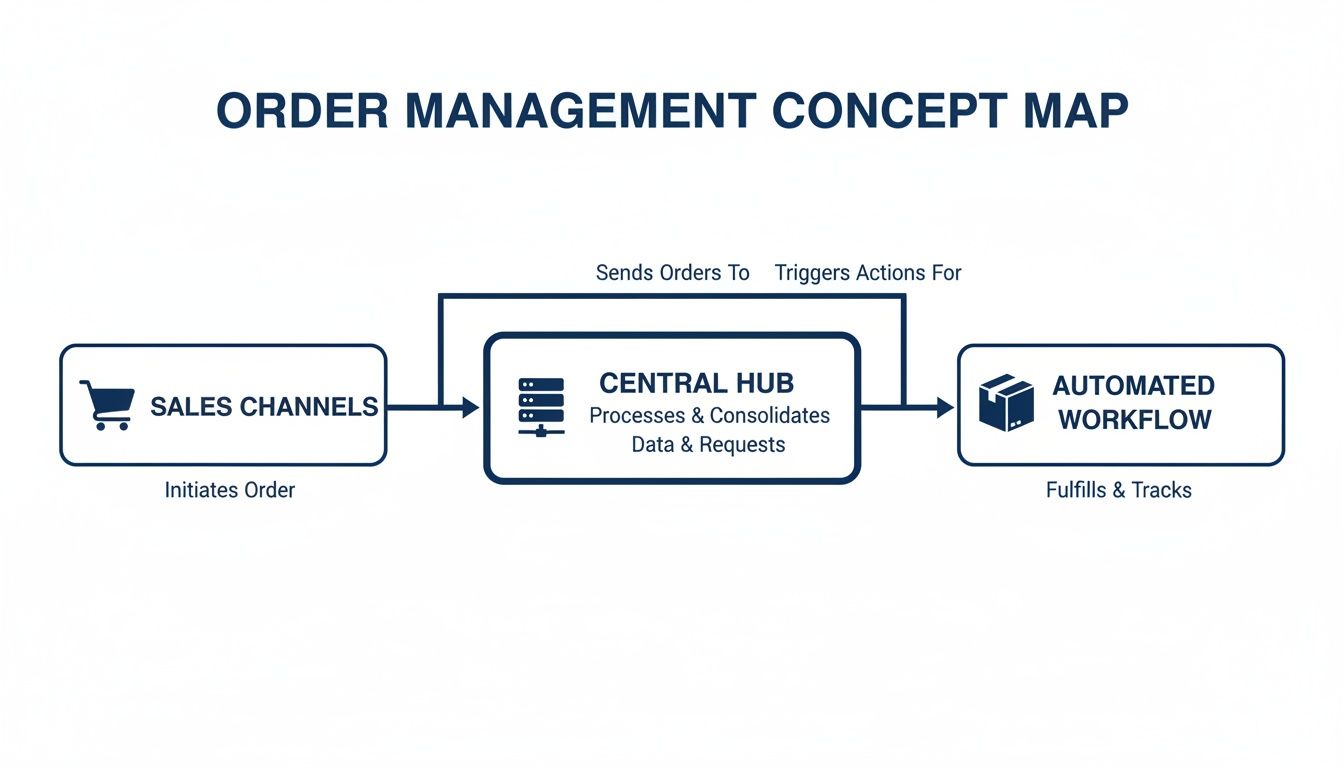
Think of it as the central nervous system for your operations. It grabs orders from every direction and pushes them through a smart, automated fulfillment workflow without missing a beat.
To give you a clearer picture of the difference this makes, here’s a quick rundown of how everyday tasks change once you ditch the spreadsheets.
This table shows the stark contrast in time and effort between manual processing and using a proper system.
| Task | Manual Process (Without OMS) | Automated Process (With OMS) |
|---|---|---|
| Order Processing | Manually log into each marketplace (Lazada, Shopee, etc.), download orders one by one, and copy-paste details into a spreadsheet. | All orders from all channels appear in a single dashboard automatically, in real-time. No manual downloads needed. |
| Inventory Updates | After a sale on one channel, you have to rush to manually update stock levels on all other channels to prevent overselling. | When an item sells, inventory is automatically deducted and updated across every single sales channel instantly. |
| Shipping & Fulfillment | Individually process orders, print labels from different courier portals, and manually enter tracking info back into each marketplace. | Bulk print hundreds of pick lists, packing slips, and shipping labels with one click. Tracking info syncs back automatically. |
| Reporting & Analysis | Spend hours exporting reports from multiple platforms and trying to stitch them together in Excel to see your true sales numbers. | Get instant, consolidated sales reports across all channels. Understand your business performance with up-to-the-minute data. |
It is clear that one path leads to burnout and the other to growth. Now, let’s break down the features that make this transformation possible.
The foundation of any good system is centralized order syncing. This feature automatically pulls every order from all of your sales channels—like Shopify, Lazada, Amazon, and TikTok Shop—into a single, unified dashboard.
Instead of your team juggling logins for four different seller centers just to download orders, everything appears in one clean list. This instantly eliminates the need to copy and paste customer details, a massive source of costly shipping mistakes.
Practical Example: A customer buys a shirt from your Shopee store. Five minutes later, another customer buys the same shirt from your website. Both orders pop up in your management software, ready to be processed together, without you ever having to switch browser tabs.
Once your orders are all in one place, the system can manage your inventory in real time across every channel. When an item sells on one marketplace, the software instantly deducts that unit from a central stock pool and updates the available quantity on all your other storefronts. This happens in seconds.
This is the most powerful way to stop overselling. Without it, you are left frantically updating stock levels by hand—a task that is impossible during a flash sale or a big campaign. This feature is the bedrock of modern stock control, and you can dive deeper into its impact in our guide on inventory management software.
Actionable Insight: By maintaining a single, accurate inventory count that syncs everywhere, you can confidently list your products on all channels without the constant fear of selling something you do not have. This protects your seller ratings and keeps customers happy.
The rapid adoption of these systems tells the story. The global market for order management systems was valued at $2,189.8 million in 2021 and is projected to hit $9,018.08 million by 2033. This boom is fueled by businesses needing scalable, cloud-based tools to keep up with unpredictable sales. You can get more details from the full report by Cognitive Market Research.
With all your orders neatly centralized, the next job is getting them out the door. A solid ecommerce order management software gives you the tools to process every order from a single interface, no matter where it came from.
This is where automated shipping workflows come in. You can select hundreds of orders at once and bulk print all the documents you need—pick lists, packing slips, and shipping labels—in the correct format for each specific courier.
Practical Example: You have 150 orders to ship—70 from Lazada, 50 from your website, and 30 from TikTok Shop. Instead of processing them in three separate batches on three different platforms, you just select all 150 in your software, hit “Print Labels,” and watch as the system spits out every label, perfectly formatted for each order’s designated courier.
No ecommerce tool is an island. A powerful ecommerce order management software has to work with the other systems that run your business. This is usually managed through an Application Programming Interface, or API.
Good integrations ensure that data flows automatically between your key platforms, creating a connected tech stack. This eliminates the need for manual data exports and imports, which saves time and prevents expensive mistakes.
Key integrations usually include:
Bringing an ecommerce order management software into your business is a strategic investment meant to pay for itself. The right system goes beyond tidying up your order list; it starts generating real, measurable financial returns. You will see these gains in four main areas: saving time, cutting costs, making customers happier, and giving you the power to grow without the usual chaos.

Let’s break down exactly how this translates into actual dollars and smoother operations, whether you’re a marketplace seller juggling multiple accounts or a DTC brand trying to scale up.
The first thing you will notice is the huge drop in manual, repetitive work. Think about all the hours your team currently spends logging into different seller portals, copying and pasting customer addresses, and manually tweaking inventory numbers. That is low-value work that directly puts the brakes on your business.
Practical Example: If your team spends just two hours a day on these manual tasks and your average team member’s hourly cost is $15, you are spending $900 per month on pure administrative friction. Automating these workflows with an ecommerce order management software can give you almost all of that time back, freeing up your people to focus on things that actually grow the business, like customer service or marketing.
Human error is an expensive and unavoidable part of doing things by hand. Every time the wrong item goes in a box, a customer gets someone else’s order, or you accidentally oversell an item, your business loses money. Those costs pile up faster than you think.
Consider the real expenses of just one shipping mistake:
By automating how orders are processed and keeping your inventory synced in real-time, you slash the chances of these mistakes ever happening. This directly protects your profit margins and plugs the leaks that silently drain your bottom line.
In ecommerce, your fulfillment process is a huge part of the customer experience. Fast, accurate, and reliable shipping is the bare minimum customers expect. A solid order management system is the engine that drives a great fulfillment experience.
When orders fly out the door quickly and correctly, customers get what they paid for, on time. This builds trust and leads to positive reviews—gold dust for attracting new buyers. A smooth post-purchase experience is one of the best ways to earn repeat business and turn one-time shoppers into loyal fans.
Actionable Insight: You sell an experience, not just a product. Accurate, on-time delivery is the final, and often most memorable, part of that experience. Getting it right consistently is a powerful driver of customer loyalty.
The market is waking up to this reality. The value of multichannel order management is projected to hit USD 9.12 billion by 2034. While big companies currently hold the largest slice of the pie, small and medium-sized businesses are the fastest-growing group, thanks to affordable cloud solutions that help them scale. You can learn more about these market dynamics in the full market research.
Wondering if the investment makes sense for your business? A quick ROI calculation can make things crystal clear. The easiest place to start is with labor savings, since it’s the most straightforward to quantify.
Here’s a simple formula to get you started:
This simple math shows just how quickly the investment can pay for itself. This calculation does not even factor in the money saved from fewer shipping errors or the extra revenue from happier, more loyal customers—which means the real ROI is even higher.
Picking the right ecommerce order management software is a big decision, but the process gets simpler with a clear plan. Your goal is to find a system that solves your day-to-day problems and can scale with you as you grow. The best fit will feel like a natural extension of your team.
This starts with knowing your own business inside and out. Before you watch a single demo, you need to map out your current order workflow. Pinpoint the biggest bottlenecks and make a list of the essential tools you cannot live without, like your accounting software or specific shipping carriers. This prep work turns your search from a guessing game into a focused, strategic evaluation.
Not all software is created equal. A system designed for a small DTC brand will buckle under the pressure of a high-volume marketplace seller. To find your perfect match, focus on what is non-negotiable for your business.
Think of these points as your initial checklist:
Actionable Insight: A powerful system that nobody on your team can figure out is effectively useless. Prioritize a clean, logical interface that makes your team’s job easier, not harder.
One of the big decisions is weighing custom software vs. off-the-shelf solutions. While a custom-built system can be perfectly molded to your unique processes, an off-the-shelf tool often delivers a faster, more affordable way to solve the common operational headaches most ecommerce brands face.
Once you have narrowed your list to a few potential vendors, it is demo time. A demo is your chance to pressure-test the software with your real-world scenarios. Walk into these meetings with specific, tough questions that go beyond marketing slides.
To see what a platform is made of, ask these critical questions:
“Can you show me—right now—your system’s real-time inventory sync speed between two of my sales channels?” This forces them to demonstrate how quickly their system prevents overselling. Make them simulate a sale on one channel and show you the inventory update on another. The delay, or lack of it, will tell you everything.
“How does your platform handle order bundling or kitting? Can it manage bundles made from separate SKUs?” This is vital for any brand selling product sets or kits. A solid OMS should automatically adjust the stock levels of the individual components every time a bundle is sold. If it cannot, you are signing up for inventory nightmares.
“What does your customer support and onboarding process actually look like? Will we get a dedicated account manager?” Great support is non-negotiable, especially during your peak season. Get details on their support hours, average response times, and what level of help is included in your plan versus what costs extra. A smooth onboarding ensures your team can use the software to its full potential from day one.
To help structure your evaluation, we have put together a simple checklist. Use this table during your demos to rate each vendor consistently and make a decision based on data.
| Evaluation Criteria | Question to Ask the Vendor | Your Rating (1-5) |
|---|---|---|
| Sales Channel Integrations | Does it natively support all our current and future sales channels? | |
| Inventory Sync Speed | Can you demonstrate real-time sync during a live sale simulation? | |
| Order Routing & Fulfillment | How does it handle multi-warehouse routing and dropshipping logic? | |
| Scalability & Performance | What are the order volume limits? Can it handle our Black Friday peaks? | |
| Ease of Use (UI/UX) | Is the interface intuitive enough for our warehouse team to learn quickly? | |
| Kitting & Bundling | Can the system manage component-level inventory for bundled products? | |
| API & 3rd-Party Integrations | Is there a robust API for connecting to our accounting/3PL/other tools? | |
| Reporting & Analytics | What kind of sales, inventory, and fulfillment reports can we generate? | |
| Onboarding & Training | What does the implementation process look like and is training included? | |
| Customer Support | What are the support hours, response times, and is there a dedicated manager? | |
| Pricing & Total Cost | What is the total cost of ownership, including all fees and potential add-ons? |
After you’ve completed your demos and filled out the checklist for each contender, you will have a much clearer picture of which software is the true best fit for your business needs. This systematic approach ensures you choose a partner, not just a product.
Making the switch to a new ecommerce order management software can feel like a massive project, but with a clear plan, it is far more manageable than you might think. The key is to break the process down into logical steps. This removes the guesswork and helps your team make a smooth transition.
The real goal is to weave the new software into the fabric of your daily operations with as little disruption as possible. This roadmap will walk you through the four essential stages—from getting your data in shape to going live—so you can sidestep common headaches and start seeing a return on your investment right away.
Before you move a single piece of data, you need to get your house in order. A little organization upfront makes the entire process run smoothly. The most critical task here is cleaning up and standardizing your Stock Keeping Units (SKUs) and confirming your inventory counts are accurate.
It is common for businesses to have different SKUs for the same product across various channels. For instance, a blue t-shirt might be “BL-TSHIRT-M” on your website but “BLUE-M-TEE” on a marketplace. Now is the time to consolidate everything into a single, master SKU list. This is the only way your new system can track products accurately from day one.
A new system is only as powerful as the people using it. Solid, hands-on training separates a smooth rollout from a frustrating one. Focus on practical sessions where your team can actually use the tool.
Actionable Insight: Run mock order drills. Create several test orders and have your team walk through the entire fulfillment cycle in the new software. They should go from seeing the order pop up on the dashboard, to printing a pick list, generating a shipping label, and finally marking it as fulfilled. This kind of hands-on practice builds real confidence.
The point of training is to make the new system feel like a genuine upgrade that makes their jobs easier. When your team sees firsthand how the software eliminates their most painful tasks, they’ll be eager to adopt it.
Going all-in at once is a recipe for chaos. A smarter approach is a phased rollout. This means you activate the new order management software one sales channel at a time, creating a controlled environment where you can test and troubleshoot before your entire operation depends on it.
Start with one of your smaller or less complicated channels. This gives you a low-risk space to work out any kinks, verify that inventory is syncing correctly, and make sure all your shipping integrations are firing as expected.
For the first week on that channel, I strongly recommend running your old and new systems in parallel. It is extra work, but it acts as a crucial safety net. You can directly compare the outputs, catch any discrepancies in order data or inventory levels, and fix them before you commit completely.
The final piece of the puzzle is connecting your new order management software to the rest of your tech stack. This is where you lock in the connections to your shipping carriers, accounting software, and any other tools that are essential to your workflow. For brands with more complex setups, this might also mean linking to an Enterprise Resource Planning (ERP) system.
Getting these connections right is what unlocks true automation, eliminating manual data entry and tying your entire operation together. If you’re tackling a more advanced setup and want to dig deeper into this, our guide on mastering ERP integration solutions offers a more detailed look.
Even after seeing all the features and benefits, it’s normal to have some practical questions. Adopting ecommerce order management software is a big move, so let’s clear up any lingering doubts.
This section tackles the most common questions we hear from growing brands. The goal is to give you direct, honest answers so you can feel confident about your decision.
The answer is not a magic number, but a set of growing pains that show your current methods cannot keep up anymore.
You’re probably ready for an order management system if any of these sound familiar:
A good rule of thumb is the “50 orders a day” benchmark. If you’re consistently hitting that number and find yourself spending more time on operations than on marketing or product development, it’s a huge sign you’ve outgrown your spreadsheets. That friction you’re feeling is your cue to invest.
Many business owners worry that new software means starting from scratch. A good order management system is meant to sharpen your workflow, not force a complete overhaul.
The core physical tasks of your operation are not going anywhere. You will still be picking items off shelves, packing them into boxes, and getting them to your customers. The real change is that the busywork around those tasks gets automated and centralized. Instead of logging into five different seller portals, your team works from one unified dashboard.
Actionable Insight: The best way to approach this is to first map out your current workflow, step-by-step. Pinpoint the most repetitive, time-sucking parts. That’s exactly where the software will slot in to give you the biggest wins, while leaving the effective parts of your process untouched.
For example, your team will still pick products, but they will do it from a single, optimized pick list that combines orders from every channel. This makes their path through the warehouse more efficient. The software should bend to your process and make it better.
Absolutely. Integration is a core purpose of modern ecommerce order management software. These systems are built to talk to all the other essential tools you use to run your business. The feature to look for here is a well-documented API (Application Programming Interface).
An API is like a universal translator that lets different software programs speak the same language. It is what allows your order management software to:
Practical Example: An order comes in from your Shopify store. With proper integration, it flows straight into your order management software. Once it’s shipped, the system automatically sends the sales data to your accounting platform and updates the inventory count in your ERP—all without anyone lifting a finger.
Before you commit to a provider, always ask for their list of pre-built integrations and confirm they have an open API. This is a make-or-break question for any demo. It’s your guarantee that the new system will play nice with your existing tech.
Pricing for order management software usually follows a subscription model based on your monthly order volume or how many sales channels you connect. Costs can run from a couple hundred to several thousand dollars a month, depending on the provider and your scale.
Justifying that cost comes down to calculating your Return on Investment (ROI), and it’s simpler than you might think. Just focus on quantifying your savings in two key areas: labor and error reduction.
1. Calculate Your Labor Savings First, add up the hours your team spends every day on manual order processing. Multiply that by their hourly wage and the number of workdays in a month. For instance, if you save 3 hours per day with staff at a $15 hourly rate over 22 workdays, your monthly labor savings alone are $990.
2. Tally Up Your Error Reduction Costs Next, estimate the monthly cost of mistakes the software will eliminate. This includes the cost of return shipping labels, sending replacement products, and the staff time spent fixing the mess. Even a conservative guess of saving $200 a month on errors adds up fast.
When you combine those figures ($990 + $200 = $1,190 in monthly savings), you can see how quickly the system pays for itself. Most businesses handling over 100 orders a day discover that the savings from labor and error reduction deliver a positive ROI in just a few months.
Ready to stop juggling spreadsheets and start scaling your operations? With OneCart, you can centralize your orders, sync inventory in real-time, and automate your fulfillment workflows across all your sales channels. See how our platform can give you back hours in your day and help you grow without the chaos.
Discover your path to smarter ecommerce management by visiting our site to get started.
Automate & Scale Your Online Business with OneCart
Start a Free TrialUsed by hundreds of merchants in Singapore & Southeast Asia