Elevate Growth with CRM and Order Management Systems for Seamless Scale 2026
Discover how CRM and order management systems streamline operations and boost customer experiences across channels.
Discover how CRM and order management systems streamline operations and boost customer experiences across channels.
For many growing e-commerce brands, customer service and warehouse operations can feel like two entirely separate businesses. This disconnect between your CRM and order management systems often leads to confusion, delays, and frustrated customers.
Integrating them bridges that gap. It connects every customer interaction with real-time order data, creating a single, reliable source of truth for your entire team.
Think of your business like a busy restaurant. Your customer service team is the friendly front-of-house staff, and your warehouse is the efficient, fast-paced kitchen. When they operate without a direct line of communication, orders get mixed up, and diners are left waiting with no updates.
A Customer Relationship Management (CRM) system and an Order Management System (OMS) working together provide the communication bridge for e-commerce sellers. This powerful duo ensures your front-of-house (customer service) knows precisely what the kitchen (warehouse) is doing at all times.
This guide will show you how to connect them, turning disjointed processes into a smooth, coordinated operation that scales with your business.
To start, let’s quickly break down the core responsibilities of each system.
The table below offers a quick look at the primary roles of a CRM and an OMS. While they both deal with customer and order information, their focus and goals are different.
| System | Primary Focus | Key Data Handled | Core Business Goal |
|---|---|---|---|
| CRM | The Customer | Contact info, support tickets, conversation history, purchase history | Build relationships, improve satisfaction, and drive loyalty. |
| OMS | The Order | Order details, inventory levels, fulfillment status, shipping data | Process orders efficiently, accurately, and quickly. |
One system focuses on the person, and the other focuses on the package. Integrating them gives you a complete, 360-degree view of your entire business.
An integrated system provides a complete picture of every customer and their orders, all in one place. This connection is essential for scaling your business on competitive marketplaces like Shopee, Lazada, or your own Shopify store.
Here’s what this unified view makes possible:
Actionable Insight: Set up a simple alert in your CRM that flags customers who have not made a purchase in 90 days but previously bought multiple times. You can then send them a personalized “we miss you” offer to re-engage them. This turns your data into repeat business.
Ultimately, combining your CRM and order management systems allows you to manage growth without sacrificing service quality. You gain the operational control needed to handle more orders while delivering the personalized attention that keeps customers coming back.

A Customer Relationship Management (CRM) system is your business’s central memory for every single customer interaction. It is much more than a simple contact list. It stores the critical details that paint a complete picture of each shopper’s journey with your brand—from their purchase history and support tickets to marketing preferences and even notes from past conversations.
This rich data transforms how you talk to your customers. You can move away from generic, one-size-fits-all messages and create personalized experiences that build real loyalty and boost customer lifetime value.
With a CRM, you gain the ability to tailor every touchpoint. For instance, a direct-to-consumer brand can use CRM data to pinpoint its most dedicated customers—the ones with high purchase frequency and a history of positive feedback.
This insight provides a clear, actionable opportunity:
This level of personalization shows customers they are valued beyond a single transaction. It’s a powerful strategy for improving customer retention.
A CRM also helps you answer customer questions faster and proactively drive repeat business. Imagine a seller on a marketplace like Lazada who notices a customer has bought the same skincare product three times in the last six months.
Practical Example: The CRM can be configured to automatically trigger an email or SMS to that specific customer around the time they are likely running low. The message could say, “Hi [Customer Name], running low on your favorite moisturizer? Reorder now and get 10% off.” This makes re-purchasing effortless and encourages loyalty.
The growth of this technology is undeniable. The global CRM software market is projected to grow from $126 billion in 2026 to over $320 billion by 2034, according to Fortune Business Insights. For sellers on Shopee and Lazada, investing in CRM tools with AI capabilities can meaningfully improve customer retention and lifetime value.
While your CRM manages the customer relationship, an Order Management System (OMS) is the operational engine that roars to life the second a customer clicks ‘Buy’. Think of it as your digital command center for everything that happens post-purchase. Its main job is to ensure every single order is fulfilled accurately, efficiently, and on time.
An OMS pulls in orders from all of your sales channels—whether that’s your TikTok Shop, Shopify store, or Amazon listings—and consolidates them into a single, clean dashboard. This eliminates the frantic scramble of logging into multiple seller centers just to see what needs to be shipped. It becomes the single source of truth for your entire fulfillment operation.
To really get how critical an OMS is, let’s follow the journey of one order. Imagine a customer just bought a pair of sneakers from your brand’s Shopee store.
Finally, once the package is handed off to the courier, the OMS updates the order status to “shipped” and pushes tracking information back to the sales channel, which then notifies your customer. You can learn more about this by checking out our guide on why your business needs an Order Management System.
Here’s a practical, real-world example of an OMS saving the day: preventing overselling during a high-traffic event like a flash sale.
Let’s say you have 50 units of a hot product and you suddenly sell 30 on Lazada and 25 on your Shopify store at the same time. A centralized OMS prevents disaster. By syncing your inventory in seconds, it stops that 51st sale from ever happening, protecting your brand’s reputation and avoiding angry customers.
Actionable Insight: Before a major sales event like 11.11, use your OMS to create “buffer stock.” If you have 100 units, set your available inventory to 95. This small buffer provides a safety net against system lags or unexpected sales surges, ensuring you don’t oversell and disappoint customers.
For any business handling 50+ orders daily, this is non-negotiable. Centralised order management eliminates overselling by syncing inventory across all channels in real time—a direct win for DTC brands expanding to marketplaces.
Ultimately, an OMS empowers your team to schedule courier pickups and manage every single fulfillment task from one central hub. This saves countless hours of manual work and ensures customers get what they ordered, when they expect it. It’s the operational backbone that allows a growing brand to scale without breaking.
When your customer-facing activities are in sync with your back-end operations, you create a unified system that benefits your entire business. This is where the magic of connecting your CRM and order management systems happens. Data flows freely between them, giving every team a complete picture of both the customer and their orders.
Let’s walk through a simple, practical example. A customer places an order on Shopee.
Now, when that same customer reaches out to your support team, the agent sees everything in one place. They can view the new order, their entire purchase history, and the real-time shipping status without ever leaving the CRM dashboard. This allows them to provide fast, accurate answers instead of putting the customer on hold to check another system.
For this synergy to work, the integration has to be a two-way street. Think of it as a constant conversation between your sales and operations teams, with the software doing all the talking. This is why platforms with an open API are so important—they act like universal translators, allowing different systems to share information seamlessly.
A successful integration ensures data flows in both directions:
This synchronized view is the foundation for robust customer journey analytics, allowing you to map out and improve every touchpoint, from the moment a customer shows interest all the way to post-purchase support.
The diagram below shows the basic journey of an order, from the moment it’s placed to when it’s shipped out, all managed by an integrated system.
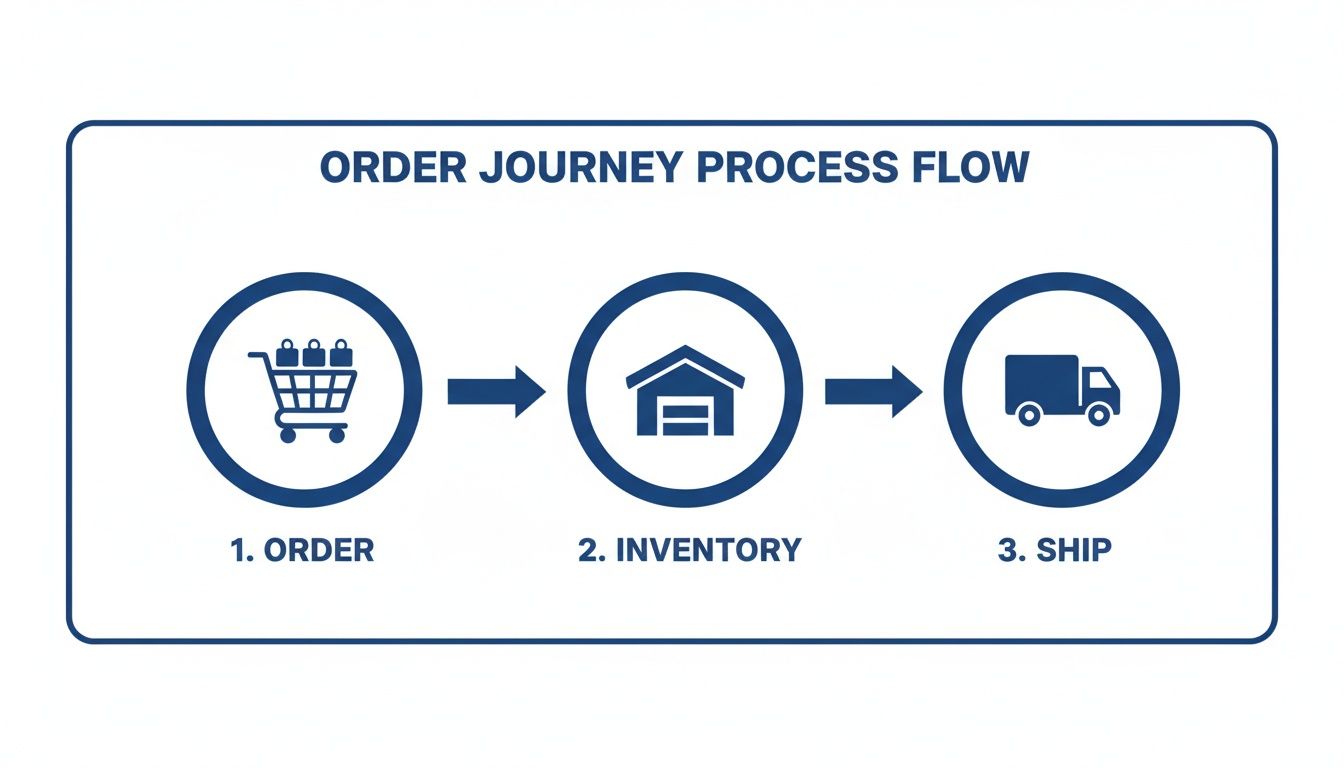
As you can see, the initial order data is used to update inventory and kick off the shipping process, creating a smooth and connected operational flow.
Here’s a closer look at how that data exchange plays out in day-to-day operations.
This table illustrates the typical flow of information between a CRM and an OMS when they are properly integrated.
| Event Trigger | Data Sent From OMS to CRM | Data Sent From CRM to OMS | Business Benefit |
|---|---|---|---|
| New Order Placed | Order details, items, shipping address, order status (e.g., “Processing”) | N/A | Support team has immediate visibility into new purchases without switching systems. |
| Shipment Created | Tracking number, carrier info, updated order status (e.g., “Shipped”) | N/A | Proactive shipping notifications can be sent from the CRM, reducing “Where is my order?” queries. |
| Customer Updates Profile | N/A | Updated contact info, address, or preferences | Ensures the next order is shipped to the correct address, preventing delivery failures. |
| Support Interaction | N/A | Special handling notes (e.g., “Fragile item, add extra padding”) | Operations team receives crucial context directly on the order, improving fulfillment quality. |
| Return Initiated | Return status, reason for return, refund status | N/A | Finance and support teams have a unified view of the return process for faster resolution. |
This constant, automated exchange of information eliminates data silos and ensures every team is working from the same playbook.
Without an integration, your team is stuck doing manual data entry—copying and pasting order details, customer addresses, and tracking numbers between systems. This is slow and a recipe for expensive mistakes. A single typo can send a package to the wrong address, leading to a frustrated customer and a direct hit to your bottom line.
Practical Example: By automating the creation of shipping labels, an integrated system eliminates address typos. The customer’s address from the order is sent directly to the OMS, which generates the label. This simple automation can reduce delivery failures by over 90%, saving you money on reshipments and keeping customers happy.
The impact of this unified approach is significant. For merchants selling across multiple marketplaces, this kind of synchronized, cloud-based solution provides a major boost in efficiency by eliminating manual data entry and keeping every team on the same page.
Alright, let’s move from theory to real-world results. For marketplace sellers and multi-channel brands, combining a CRM and order management system creates powerful workflows that actually drive growth. It’s how you make your data start working for you, turning everyday transactions into genuine opportunities to build loyalty.
When these systems are integrated, you can finally translate raw order data into smart, proactive customer service and marketing that feels personal. By connecting what customers buy with who they are, you unlock a whole new level of control over your operations and marketing.
One of the most powerful things you can do is use purchase data from your OMS to build laser-focused marketing segments in your CRM. This lets you send out highly relevant campaigns that feel like they were made just for that one customer.
A fantastic example is a simple “time to re-order” campaign.
This simple workflow puts repeat business on autopilot and shows customers you’re paying attention to their habits. You can do the same thing by segmenting customers based on their total spending. High-value customers can be automatically flagged for some special treatment.
Actionable Insight: Set up a workflow where any order over a certain value (say, $150) triggers a task for your customer service team to send a personalized thank-you note. It’s a small touch that builds serious loyalty.
A unified system completely transforms your customer service from reactive to proactive. Instead of waiting for customers to flood your inbox with “Where is my order?”, you can send them updates before they even think to ask. When your OMS and CRM are in sync, your support team gets a complete, real-time view of every single order’s journey.
Imagine a shipping delay happens. The OMS flags the order, and that status update flows straight into the CRM. Your support team can immediately see which customers are affected and fire off a proactive message explaining the situation. To take your service to the next level, you can learn more about building a strong foundation with our insights on multi-channel ecommerce solutions.
This shift completely changes the customer experience. A potential negative (a delay) becomes an opportunity to show off your excellent communication and build trust. This often leads to even higher customer satisfaction than if the order had just arrived on time with no communication at all.
Returns are an unavoidable part of e-commerce, but they don’t have to be a major headache. Integrating your CRM and order management systems creates a smooth, transparent process for both your team and your customers.
Here’s a look at how it works:
This automated workflow cuts down on manual work, slashes errors, and keeps the customer in the loop every step of the way—turning a potentially frustrating experience into a surprisingly seamless one.
Connecting your CRM and order management systems doesn’t have to be a massive, disruptive overhaul. A structured, step-by-step approach is the key to getting it done smoothly and seeing an immediate return on your efforts.
Let’s break down the process into a clear framework, taking you all the way from initial planning to getting your entire team on board.
The first step is to get honest about your current workflows. Map out every single action, from the moment an order is placed on any channel to the second it lands on the customer’s doorstep. This simple exercise will throw a spotlight on your biggest bottlenecks. Is it the hours spent on manual data entry? The frustrating delays in the warehouse? Or just constant communication gaps between your teams?
Once you’ve identified your pain points, you can decide what to tackle first. For most marketplace sellers, the biggest and fastest win comes from centralizing order processing and syncing inventory levels. It’s the most direct way to stop overselling and slash the time your team wastes hopping between different seller dashboards.
A huge part of your implementation framework is thoughtfully choosing CRM software that actually fits your business. Always prioritize platforms with open APIs. Why? Because they are built to talk to other systems. This flexibility is what allows your CRM and order management systems to share data without needing a team of developers to build complex, custom bridges.
If you want to go deeper on system connectivity, our guide on mastering ERP integration solutions is a great next step.
Whatever you do, don’t try to boil the ocean. A phased rollout is your best friend here—it minimizes disruption and lets you build momentum with quick wins.
Actionable Insight: Start with the absolute core integration: syncing order and customer data. This simple connection gives your support team instant access to order history and shipping status right inside the CRM. The ROI is immediate—faster response times, fewer mistakes, and happier customers.
Follow this simple checklist for a successful rollout:
Finally, make sure your team is trained not just on the software, but on the new process. When everyone understands how the integrated system solves their daily frustrations, adoption stops being a chore and starts feeling like a natural upgrade. That’s when the real benefits start to multiply across your entire operation.
Even with a clear plan, it’s natural for a few questions to pop up when you’re thinking about connecting your CRM and order management software. Let’s tackle some of the most common ones we hear from sellers.
Yes, absolutely. For many growing stores, starting with only an Order Management System (OMS) is the right move. If your biggest headache is juggling orders and inventory across Shopee, Lazada, or Shopify, an OMS delivers the most immediate value. It’s built to fix operational chaos like overselling and manual fulfillment.
Once your operations are running smoothly, adding a CRM is the logical next step. With a solid operational foundation in place, you can then start focusing on building deeper customer relationships, personalizing your marketing, and driving the long-term loyalty that really scales a brand.
The difficulty can vary, but it has gotten much easier. Modern systems are designed to talk to each other. Most platforms built for e-commerce come with standard APIs, which act like universal adapters, allowing them to connect to different CRMs and other business tools with minimal custom coding.
Practical Tip: Look for platforms that offer “native integrations” or “pre-built connectors.” These are plug-and-play solutions that can often be set up in a few clicks without any coding, making the process much faster and more affordable than a fully custom project.
The best place to start is by mapping your current process. Grab a whiteboard or a notebook and trace every single step—from the moment an order comes in to when it’s delivered, and don’t forget how you handle customer service questions along the way.
This simple audit will shine a spotlight on your biggest pain points. You’ll quickly see if you’re losing too much time hopping between seller centers or losing sales to stockouts. Once you know the core problem you need to solve, you can choose the right tool to fix it. For most marketplace sellers, this usually means starting with a robust OMS to build a strong operational backbone for the business.
Stop juggling multiple seller centers and start scaling your business with a single, unified dashboard. With OneCart, you can manage all your orders, inventory, and listings from Shopee, Lazada, TikTok Shop, and Shopify in one place. Book a demo today and see how you can achieve ROI in just days.
Automate & Scale Your Online Business with OneCart
Start a Free TrialUsed by hundreds of merchants in Singapore & Southeast Asia